
Updated On:
TikTok ad creative specs for In-Feed and Spark Ads
TikTok ad creative specs for In-Feed and Spark Ads
Written By

" height="20px" id="fXPtLeYUp" width="20px"/></svg>)
Growth Marketer
Reviewed By

Co-founder and CEO
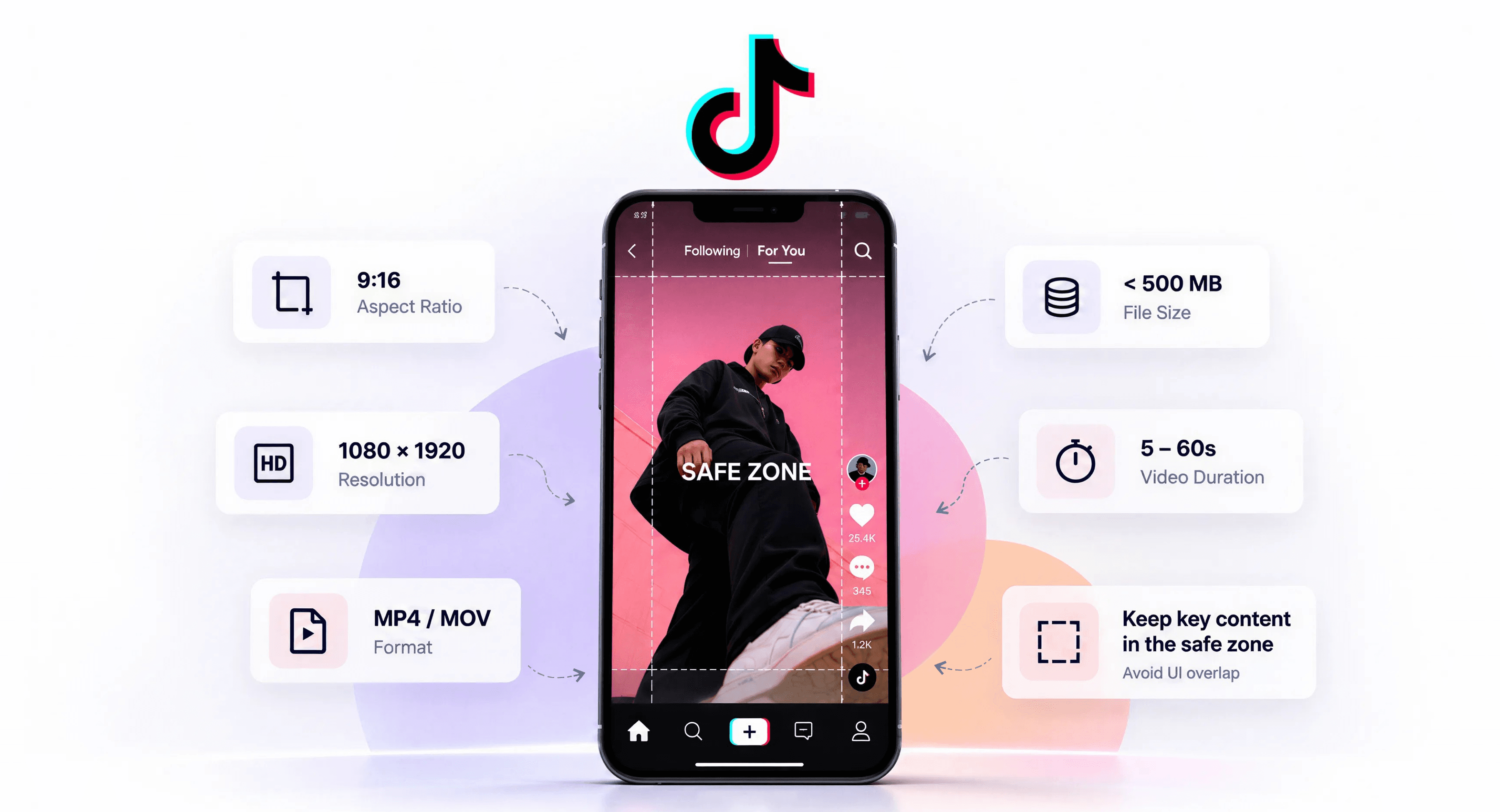
Pull up any TikTok ad specs guide, and you will usually find a table with a top safe zone and a bottom safe zone stated in pixels.
The numbers differ from guide to guide, which should be the first clue.
TikTok’s baseline specs for in-feed video are straightforward:
vertical 9:16 is the recommended format,
540 x 960 is the minimum resolution,
500 MB is the file-size cap,
516 kbps is the minimum bitrate,
and non-Spark uploads can run up to 10 minutes, while Spark Ads inherit the organic post and do not carry a duration limit.
TikTok’s own documentation explains why static spec tables are not enough.
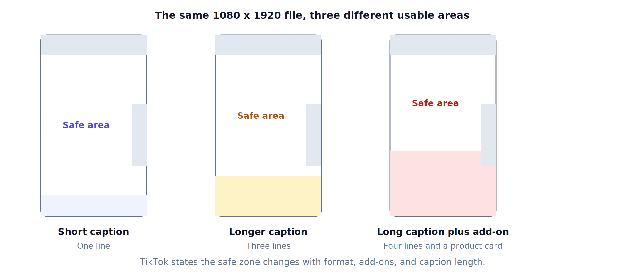
The safe zone is determined by the ad dimension format and the caption length, and TikTok ad formats can shift it again depending on what you run.
Write a longer caption and your safe zone shrinks.
For enterprise marketing and creative teams producing TikTok ads at scale, that gap between the published minimums and the real frame is where approvals, brand compliance, and performance start to break.
Here is what TikTok actually specifies, and how to build against a spec that moves.
The technical Ad specifications TikTok publishes
These are the core specs for TikTok in-feed ads, and in TikTok Ads Manager these requirements apply to video ads, including video format, video resolution, and maximum file size.
| Requirement | Non-Spark in-feed |
|---|---|
| Aspect ratio | 9:16 vertical recommended, 1:1 square, 16:9 horizontal |
| Video resolution | 540 x 960 vertical, 640 x 640 square, 960 x 540 horizontal |
| File formats | TikTok accept MP4, MOV, MPEG, 3GP, and AVI video files |
| Maximum file size | 500 MB or less |
| Bitrate | 516 kbps minimum |
| Max video length | Up to 10 minutes |
| Profile image | 98 x 98 px, 1:1, under 50 KB, JPG or PNG |
| Requirement | Non-Spark in-feed |
|---|---|
| Aspect ratio | 9:16 vertical recommended, 1:1 square, 16:9 horizontal |
| Video resolution | 540 x 960 vertical, 640 x 640 square, 960 x 540 horizontal |
| File formats | TikTok accept MP4, MOV, MPEG, 3GP, and AVI video files |
| Maximum file size | 500 MB or less |
| Bitrate | 516 kbps minimum |
| Max video length | Up to 10 minutes |
| Profile image | 98 x 98 px, 1:1, under 50 KB, JPG or PNG |
Pull up any TikTok ad specs guide, and you will usually find a table with a top safe zone and a bottom safe zone stated in pixels.
The numbers differ from guide to guide, which should be the first clue.
TikTok’s baseline specs for in-feed video are straightforward:
vertical 9:16 is the recommended format,
540 x 960 is the minimum resolution,
500 MB is the file-size cap,
516 kbps is the minimum bitrate,
and non-Spark uploads can run up to 10 minutes, while Spark Ads inherit the organic post and do not carry a duration limit.
TikTok’s own documentation explains why static spec tables are not enough.
The safe zone is determined by the ad dimension format and the caption length, and TikTok ad formats can shift it again depending on what you run.
Write a longer caption and your safe zone shrinks.
For enterprise marketing and creative teams producing TikTok ads at scale, that gap between the published minimums and the real frame is where approvals, brand compliance, and performance start to break.
Here is what TikTok actually specifies, and how to build against a spec that moves.
The technical Ad specifications TikTok publishes
These are the core specs for TikTok in-feed ads, and in TikTok Ads Manager these requirements apply to video ads, including video format, video resolution, and maximum file size.
| Requirement | Non-Spark in-feed |
|---|---|
| Aspect ratio | 9:16 vertical recommended, 1:1 square, 16:9 horizontal |
| Video resolution | 540 x 960 vertical, 640 x 640 square, 960 x 540 horizontal |
| File formats | TikTok accept MP4, MOV, MPEG, 3GP, and AVI video files |
| Maximum file size | 500 MB or less |
| Bitrate | 516 kbps minimum |
| Max video length | Up to 10 minutes |
| Profile image | 98 x 98 px, 1:1, under 50 KB, JPG or PNG |
Pull up any TikTok ad specs guide, and you will usually find a table with a top safe zone and a bottom safe zone stated in pixels.
The numbers differ from guide to guide, which should be the first clue.
TikTok’s baseline specs for in-feed video are straightforward:
vertical 9:16 is the recommended format,
540 x 960 is the minimum resolution,
500 MB is the file-size cap,
516 kbps is the minimum bitrate,
and non-Spark uploads can run up to 10 minutes, while Spark Ads inherit the organic post and do not carry a duration limit.
TikTok’s own documentation explains why static spec tables are not enough.
The safe zone is determined by the ad dimension format and the caption length, and TikTok ad formats can shift it again depending on what you run.
Write a longer caption and your safe zone shrinks.
For enterprise marketing and creative teams producing TikTok ads at scale, that gap between the published minimums and the real frame is where approvals, brand compliance, and performance start to break.
Here is what TikTok actually specifies, and how to build against a spec that moves.
The technical Ad specifications TikTok publishes
These are the core specs for TikTok in-feed ads, and in TikTok Ads Manager these requirements apply to video ads, including video format, video resolution, and maximum file size.
| Requirement | Non-Spark in-feed |
|---|---|
| Aspect ratio | 9:16 vertical recommended, 1:1 square, 16:9 horizontal |
| Video resolution | 540 x 960 vertical, 640 x 640 square, 960 x 540 horizontal |
| File formats | TikTok accept MP4, MOV, MPEG, 3GP, and AVI video files |
| Maximum file size | 500 MB or less |
| Bitrate | 516 kbps minimum |
| Max video length | Up to 10 minutes |
| Profile image | 98 x 98 px, 1:1, under 50 KB, JPG or PNG |
The Impact
106
It uses technology to produce and adapt creative assets across formats, channels, and campaigns.
Source: Rocketium customer data, 2026
Why the safe zone has no fixed number
In its interactive add-on specifications, TikTok states that each key element such as text and logos must sit within the safe zone or it may be covered or cropped.
The safe zone size is determined by the ad dimension format, that additional format usage can change it, and that the longer a caption is, the smaller the safe zone becomes.
That last point is the one worth sitting with. Your caption copy, along with the TikTok UI overlay, retroactively changes how much of the frame your designer could safely use. In practice, ad captions are often the thing that shrinks the usable area after the creative is finished. The video was built correctly. The caption made it wrong.
What This Means for Production
Three practical consequences follow.
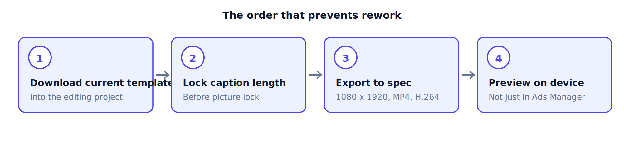
Download the templates, do not copy the numbers: TikTok provides downloadable safe zone files, including separate versions for right-to-left regions and for ads using anchors. Those belong in the editing project as timeline guides before the first cut, not as a check at export, and they help you check the ad video against the live TikTok UI before export.
Lock caption length before the final export: If copy is still moving after picture lock, the safe zone is still moving too. Finalize CTA wording in both the video and the caption before export as well, since it affects safe area planning, final composition, and caption limits. That also helps protect the profile icon and other overlays from covering important content.
Preview before you buy: TikTok notes that the preview may differ slightly from the live version because the preview is not device-specific, which is a reason to preview on more than one device rather than a reason to skip it. It also confirms that the whole screen composition still works on device.
Spark Ads and Non-Spark Ads Follow Different Rules
The single biggest source of confusion on this topic is that “TikTok ad specs” describes different rule sets because TikTok offers multiple format-specific requirements, including in-feed placements that appear natively in the For You feed and are skippable.
| Non-Spark | Spark | |
|---|---|---|
| Source | New upload through Ads Manager | The original post |
| Duration | Up to 10 minutes | No restriction |
| Caption | White, uniform font, no links, mentions, or hashtags | Pulled from the original organic caption |
| Caption display | Up to 4 lines including emojis | Up to 4 lines including emojis |
| Profile image | Default used if left blank | The posting account’s profile |
| Non-Spark | Spark | |
|---|---|---|
| Source | New upload through Ads Manager | The original post |
| Duration | Up to 10 minutes | No restriction |
| Caption | White, uniform font, no links, mentions, or hashtags | Pulled from the original organic caption |
| Caption display | Up to 4 lines including emojis | Up to 4 lines including emojis |
| Profile image | Default used if left blank | The posting account’s profile |
| Non-Spark | Spark | |
|---|---|---|
| Source | New upload through Ads Manager | The original post |
| Duration | Up to 10 minutes | No restriction |
| Caption | White, uniform font, no links, mentions, or hashtags | Pulled from the original organic caption |
| Caption display | Up to 4 lines including emojis | Up to 4 lines including emojis |
| Profile image | Default used if left blank | The posting account’s profile |
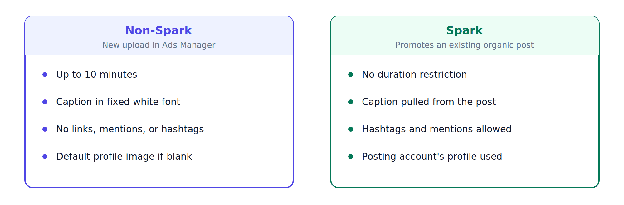
Spark Ads use the original post as ad creative, which is why they carry no duration limit and can keep hashtags and mentions that a non-Spark caption is not permitted to use. They can also bypass standard caption limits because they inherit the original post caption, while non-Spark follows caption limits. That difference is a creative planning input, not a technicality. A brand running both is working to two caption rulebooks in the same campaign, and briefing them identically produces a rejection or a flattened caption.
Spark Ads and Non-Spark Ads Follow Different Rules
The single biggest source of confusion on this topic is that “TikTok ad specs” describes different rule sets because TikTok offers multiple format-specific requirements, including in-feed placements that appear natively in the For You feed and are skippable.
| Non-Spark | Spark | |
|---|---|---|
| Source | New upload through Ads Manager | The original post |
| Duration | Up to 10 minutes | No restriction |
| Caption | White, uniform font, no links, mentions, or hashtags | Pulled from the original organic caption |
| Caption display | Up to 4 lines including emojis | Up to 4 lines including emojis |
| Profile image | Default used if left blank | The posting account’s profile |
Spark Ads use the original post as ad creative, which is why they carry no duration limit and can keep hashtags and mentions that a non-Spark caption is not permitted to use. They can also bypass standard caption limits because they inherit the original post caption, while non-Spark follows caption limits. That difference is a creative planning input, not a technicality. A brand running both is working to two caption rulebooks in the same campaign, and briefing them identically produces a rejection or a flattened caption.
The Specs Most Guides Get Wrong
Worth checking your own briefing templates against these, because published guidance in this category lags TikTok’s documentation. A safe-zone rule is especially misleading across placements like topview ads, which appear as full-screen video on app open. The same issue shows up with brand takeover ads, which run for 3 to 5 seconds, so format-specific guides still need to be checked separately. It also applies to carousel ads: they can include 2 to 35 images, which is exactly the kind of format-level detail generic TikTok spec summaries often miss.
Check Your Briefing Template Against These
Duration: TikTok’s auction in-feed documentation lists up to 10 minutes. A large share of published spec sheets still quote a 60-second maximum, which was the older ceiling in many video length guides. If your creative briefs still say 60 seconds, they are enforcing a limit TikTok removed.
Safe zone as a constant: Any guide giving one pixel figure is describing a single scenario, not the rule.
Accepted formats: These are video format requirements: MPEG, 3GP, and AVI are accepted alongside MP4 and MOV, though MP4 with H.264 remains the safest export for avoiding transcoding artifacts.
Minimum resolution as a target: 540 x 960 is the documented floor for uploads in TikTok video ads and a poor production standard.
The Specs Most Guides Get Wrong
Worth checking your own briefing templates against these, because published guidance in this category lags TikTok’s documentation. A safe-zone rule is especially misleading across placements like topview ads, which appear as full-screen video on app open. The same issue shows up with brand takeover ads, which run for 3 to 5 seconds, so format-specific guides still need to be checked separately. It also applies to carousel ads: they can include 2 to 35 images, which is exactly the kind of format-level detail generic TikTok spec summaries often miss.
Check Your Briefing Template Against These
Duration: TikTok’s auction in-feed documentation lists up to 10 minutes. A large share of published spec sheets still quote a 60-second maximum, which was the older ceiling in many video length guides. If your creative briefs still say 60 seconds, they are enforcing a limit TikTok removed.
Safe zone as a constant: Any guide giving one pixel figure is describing a single scenario, not the rule.
Accepted formats: These are video format requirements: MPEG, 3GP, and AVI are accepted alongside MP4 and MOV, though MP4 with H.264 remains the safest export for avoiding transcoding artifacts.
Minimum resolution as a target: 540 x 960 is the documented floor for uploads in TikTok video ads and a poor production standard.
Repurposing From Meta Is Not a Free Transfer
Both platforms use 9:16 at 1080 x 1920, so the file transfers cleanly. The frame does not.
TikTok’s interface stack, caption row, and CTA in tiktok in feed occupy different parts of the frame than Instagram’s, and any landing page linked from TikTok ads also needs to load properly on mobile, and its full screen video presentation is more immersive, so a Reel built to Instagram’s safe zone can have its lower third obscured on TikTok. TikTok Shop placements compound it, since a product card pinned to the bottom of the video takes more of the frame again, and other formats may need separate framing even when the master file dimensions match.
One Master and Two Safe Areas
The practical rule is that the master can be shared and the safe area cannot. Building one 9:16 master with the most restrictive safe zone marked, then exporting per platform, costs less than discovering the problem in a live campaign.
Repurposing From Meta Is Not a Free Transfer
Both platforms use 9:16 at 1080 x 1920, so the file transfers cleanly. The frame does not.
TikTok’s interface stack, caption row, and CTA in tiktok in feed occupy different parts of the frame than Instagram’s, and any landing page linked from TikTok ads also needs to load properly on mobile, and its full screen video presentation is more immersive, so a Reel built to Instagram’s safe zone can have its lower third obscured on TikTok. TikTok Shop placements compound it, since a product card pinned to the bottom of the video takes more of the frame again, and other formats may need separate framing even when the master file dimensions match.
One Master and Two Safe Areas
The practical rule is that the master can be shared and the safe area cannot. Building one 9:16 master with the most restrictive safe zone marked, then exporting per platform, costs less than discovering the problem in a live campaign.
Where This Becomes a Production Problem
At ten assets, the safe zone rules are a design discipline. At a thousand, across markets, offers, and Spark and non-Spark variants, they become a systems problem tied to running ads at scale, because the checking step is the one repeated most.
Rocketium’s automated size adaptation produces the platform-ready set from one approved master, and platform compliance checks validate dimensions, file type, weight, brand compliance, and asset compliance against each destination’s rules before an asset reaches review, with dynamic content requiring motion and audio and any static image usage staying below 50% where that rule applies. Human designers review output before delivery, including checks for properly licensed music and footage, and the creative judgment about what belongs in the frame stays with your team.
The relevant proof is about rejections rather than performance. NIVEA launched campaigns across 14 platforms twice as fast with 98% fewer platform rejections, a Rocketium-reported customer figure, improving campaign-scale brand visibility by keeping more approved assets live across channels.
Where This Becomes a Production Problem
At ten assets, the safe zone rules are a design discipline. At a thousand, across markets, offers, and Spark and non-Spark variants, they become a systems problem tied to running ads at scale, because the checking step is the one repeated most.
Rocketium’s automated size adaptation produces the platform-ready set from one approved master, and platform compliance checks validate dimensions, file type, weight, brand compliance, and asset compliance against each destination’s rules before an asset reaches review, with dynamic content requiring motion and audio and any static image usage staying below 50% where that rule applies. Human designers review output before delivery, including checks for properly licensed music and footage, and the creative judgment about what belongs in the frame stays with your team.
The relevant proof is about rejections rather than performance. NIVEA launched campaigns across 14 platforms twice as fast with 98% fewer platform rejections, a Rocketium-reported customer figure, improving campaign-scale brand visibility by keeping more approved assets live across channels.
Build for the Frame Rather Than the File
Most spec guides, including the tables above, describe a file, but most TikTok ad formats are really defined by the frame the user sees, not just the asset that gets uploaded. TikTok is one of the few platforms where a technically perfect file can still be the wrong asset, because the interface is drawn over your creative and the amount it covers depends on decisions made after the edit is finished.
So the useful discipline is not memorizing numbers that change. It is treating the safe zone as a live constraint with an owner: someone confirms the caption length before picture lock, audio choices get locked early too, and when it fits the brand, trending music is chosen to improve engagement while captions stay in the local language and the cut is built for sound on with the current template already in the edit; the preview gets checked on a real device before spend starts.
Get that workflow right, and the specs mostly take care of themselves. Get it wrong, and you will keep producing correct files that arrive on the platform with the important part covered up.
If your team is producing video creative at a volume where that check has stopped happening reliably, run one real brief through AI Studio and compare what comes back against your last campaign set.
Build for the Frame Rather Than the File
Most spec guides, including the tables above, describe a file, but most TikTok ad formats are really defined by the frame the user sees, not just the asset that gets uploaded. TikTok is one of the few platforms where a technically perfect file can still be the wrong asset, because the interface is drawn over your creative and the amount it covers depends on decisions made after the edit is finished.
So the useful discipline is not memorizing numbers that change. It is treating the safe zone as a live constraint with an owner: someone confirms the caption length before picture lock, audio choices get locked early too, and when it fits the brand, trending music is chosen to improve engagement while captions stay in the local language and the cut is built for sound on with the current template already in the edit; the preview gets checked on a real device before spend starts.
Get that workflow right, and the specs mostly take care of themselves. Get it wrong, and you will keep producing correct files that arrive on the platform with the important part covered up.
If your team is producing video creative at a volume where that check has stopped happening reliably, run one real brief through AI Studio and compare what comes back against your last campaign set.
Frequently Asked Questions
What are the TikTok ad specs?
TikTok video ads recommend 9:16 vertical video, and these are the platform’s core video specs: minimum 540 x 960, in MP4, MOV, MPEG, 3GP, or AVI, at 500 MB or less with a bitrate of at least 516 kbps; in practice, 720 x 1280 is a better working minimum, and 9 to 15 seconds is often the best-performing range. Non-Spark in-feed video can run up to 10 minutes.
What is the TikTok safe zone?
The area of the frame TikTok’s interface does not cover. TikTok states the size depends on the ad format, any add-ons used, and caption length, so it varies. Use TikTok’s downloadable safe zone templates rather than a fixed figure.
How long can a TikTok ad be?
Video duration varies by format. Non-Spark auction in-feed ads can run up to 10 minutes per TikTok’s documentation. Spark Ads carry no duration restriction because they use an existing organic post. Even so, although some formats allow longer uploads, many TikTok ads perform best around 9 to 15 seconds.
What is the difference between Spark and non-Spark ads?
Spark Ads promote an existing organic post and inherit its caption, including hashtags and mentions, while non-Spark has stricter ad description rules. Non-Spark ads are new uploads whose captions display in a fixed white font, are subject to a 100-character limit, and do not support clickable links, mentions, or hashtags.
Can I reuse Instagram Reels creative on TikTok?
The file transfers, since both use 9:16 at 1080 x 1920. The safe zones differ, so a Reel built to Instagram’s interface can have its lower third covered on TikTok. Re-export against TikTok’s template.
What file size can a TikTok ad be?
500 MB or less for in-feed video as the maximum file size. Exceeding it means re-encoding with higher compression, which is why exporting at a sensible bitrate rather than a maximum one saves a round trip.
Why was my TikTok ad rejected?
Common technical causes are an unsupported format, a file over 500 MB, a bitrate below 516 kbps, or resolution under the documented minimum, and inappropriate content can also trigger rejection. Policy rejections are separate and assessed during ad review, and issues with brand compliance, unlicensed music or footage, or weak creative quality such as unclear audio and low-resolution visuals can also cause problems.
Frequently Asked Questions
What are the TikTok ad specs?
TikTok video ads recommend 9:16 vertical video, and these are the platform’s core video specs: minimum 540 x 960, in MP4, MOV, MPEG, 3GP, or AVI, at 500 MB or less with a bitrate of at least 516 kbps; in practice, 720 x 1280 is a better working minimum, and 9 to 15 seconds is often the best-performing range. Non-Spark in-feed video can run up to 10 minutes.
What is the TikTok safe zone?
The area of the frame TikTok’s interface does not cover. TikTok states the size depends on the ad format, any add-ons used, and caption length, so it varies. Use TikTok’s downloadable safe zone templates rather than a fixed figure.
How long can a TikTok ad be?
Video duration varies by format. Non-Spark auction in-feed ads can run up to 10 minutes per TikTok’s documentation. Spark Ads carry no duration restriction because they use an existing organic post. Even so, although some formats allow longer uploads, many TikTok ads perform best around 9 to 15 seconds.
What is the difference between Spark and non-Spark ads?
Spark Ads promote an existing organic post and inherit its caption, including hashtags and mentions, while non-Spark has stricter ad description rules. Non-Spark ads are new uploads whose captions display in a fixed white font, are subject to a 100-character limit, and do not support clickable links, mentions, or hashtags.
Can I reuse Instagram Reels creative on TikTok?
The file transfers, since both use 9:16 at 1080 x 1920. The safe zones differ, so a Reel built to Instagram’s interface can have its lower third covered on TikTok. Re-export against TikTok’s template.
What file size can a TikTok ad be?
500 MB or less for in-feed video as the maximum file size. Exceeding it means re-encoding with higher compression, which is why exporting at a sensible bitrate rather than a maximum one saves a round trip.
Why was my TikTok ad rejected?
Common technical causes are an unsupported format, a file over 500 MB, a bitrate below 516 kbps, or resolution under the documented minimum, and inappropriate content can also trigger rejection. Policy rejections are separate and assessed during ad review, and issues with brand compliance, unlicensed music or footage, or weak creative quality such as unclear audio and low-resolution visuals can also cause problems.
Recent Posts
Explore expert insights, creative strategies, and practical guides to help your brand create better content and scale faster.



See AI Studio in action for a real brief of your brand at zero cost and commitment.
See AI Studio in action for a real brief of your brand at zero cost and commitment.
See AI Studio in action for a real brief of your brand at zero cost and commitment.
See AI Studio in action for a real brief of your brand at zero cost and commitment.