
Snapchat ad specs: 2026 guide (with examples)
Article
Claron Kinny
|
Growth & Content

One full-screen idea works when one thought can carry the message. When the campaign needs either progression or product choice, Story and Collection Ads solve different problems.
Use Snapchat Stories for progression and Collections for product discovery
Story Ads and Collection Ads both create more room than a standard Single Image or Video Ad, but they use that room differently.
A Story extends the message across several moments. A Collection Ad extends the number of products a customer can explore.
Choosing between them becomes much easier once the team knows whether it needs to tell more of the story or show more of the assortment.
Snapchat Story Ads should give every tap a reason to happen
Story Ads let the customer move through several images or videos. The individual assets still follow Snapchat's vertical format, but the sequence introduces another creative responsibility.
The first Snap needs to make the second one worth seeing. The next frame can add a benefit, demonstration, product, proof point, use case, or payoff that was not already available in the opening.
If every frame can move into another position without changing the experience, the campaign is using Story as a container rather than as a sequence.
Story check Put every frame beside the others and explain why each one appears where it does. If the order makes no difference, the sequence probably needs a stronger progression before Production begins. |
The same sequence can become harder to maintain across markets because longer translations, regional offers, or different product assortments affect pacing as well as copy. A structured creative localization workflow keeps those changes connected to the approved campaign rather than treating localization as simple copy replacement.
Collection Ads put product discovery inside the creative
Collection Ads combine a full-screen hero image or video with four tappable product tiles, giving shoppers a path from campaign creative into individual products.
The hero still follows the standard Snapchat ad specs, but its composition has to leave room for the shopping interface.
A logo, claim, or call to action that sits comfortably near the bottom of a normal vertical video can compete with the product tiles once the same master becomes a Collection Ad.
The tile imagery needs equal attention. Product photography that looks strong on a product detail page can become difficult to recognize once it is reduced to a compact shopping tile.
Nice One shows why the shopping layout can be part of the test
Beauty retailer Nice One tested Snapchat's revised four-tile Dynamic Collection Ad against the previous layout. Snap reports 171% more purchases, 474.8% more clicks, and a 69.8% lower cost per purchase during the July 2025 test.
The broader lesson is not that every brand should copy that treatment. Product hierarchy and shopping structure can themselves influence performance.
Which product gets visual emphasis, how the hero and tiles divide attention, and how clearly products read at thumbnail size can all become useful things to test.

The Nice One campaign shows the Collection treatment in context.
Once the products come from a catalog rather than being placed manually in the design, another part of the system starts affecting creative quality.
Snapchat Dynamic Product Ads make product data part of creative QA
Dynamic Product Ads connect Snapchat to a product catalog and use product and behavioral signals to determine which items appear.
Snapchat's current catalog specification can pull product imagery, titles, descriptions, availability, pricing, identifiers, and destination URLs into the ad experience. For E-commerce teams, the design file is no longer the only thing that needs review.
A strong hero creative cannot compensate for an outdated product image, incorrect price, unavailable item, or destination URL pointing to the wrong variant. The product feed has become part of creative QA.
Teams already dealing with similar dependencies across Amazon, Walmart, and other retailers will recognize the same operational problem. Retail media creative production also depends on product data, platform requirements, and visual execution staying synchronized as the campaign grows.
The more product data the ad uses, the more valuable clean inputs become.
Commercials change the edit because part of the attention is guaranteed
Commercial Ads appear within Snapchat's curated content and are video-only.
Standard Commercials last 3 to 6 seconds and remain non-skippable throughout. Extended Play Commercials can run from 7 to 180 seconds, with the first six seconds non-skippable.
Standard Commercial | Extended Play Commercial | |
|---|---|---|
Duration | 3 to 6 sec | 7 to 180 sec |
Non-skippable | Entire unit | First six sec |
Canvas | 9:16, 720 × 1280 | 9:16, 720 × 1280 |
File | H.264 MP4/MOV | H.264 MP4/MOV |
A conventional skippable video spends its opening earning another second of attention.
A Standard Commercial already owns a short viewing window. The edit can use those seconds to complete one strong idea rather than spending half of them building toward the point.
Extended Play creates a slightly different challenge. The opening six seconds should still feel complete while giving someone a reason to continue.
If the same campaign film needs a six-second Commercial, a 15-second performance cut, and a longer version, the assets should share the underlying creative logic where appropriate. They do not need to become three unrelated creative projects.
Levi's gives video and AR different jobs
Levi's combined a First Commercial and First Lens during a six-week holiday campaign in France.
The Commercial reinforced its "Timeless Gift" campaign message, while the Lens let Snapchatters experience the range. Snap reports stronger engagement among people exposed to the premium formats alongside its traffic activity, as well as lifts in action intent and ad awareness.
The formats were not solving the same problem. Video carried the message, while AR created participation.
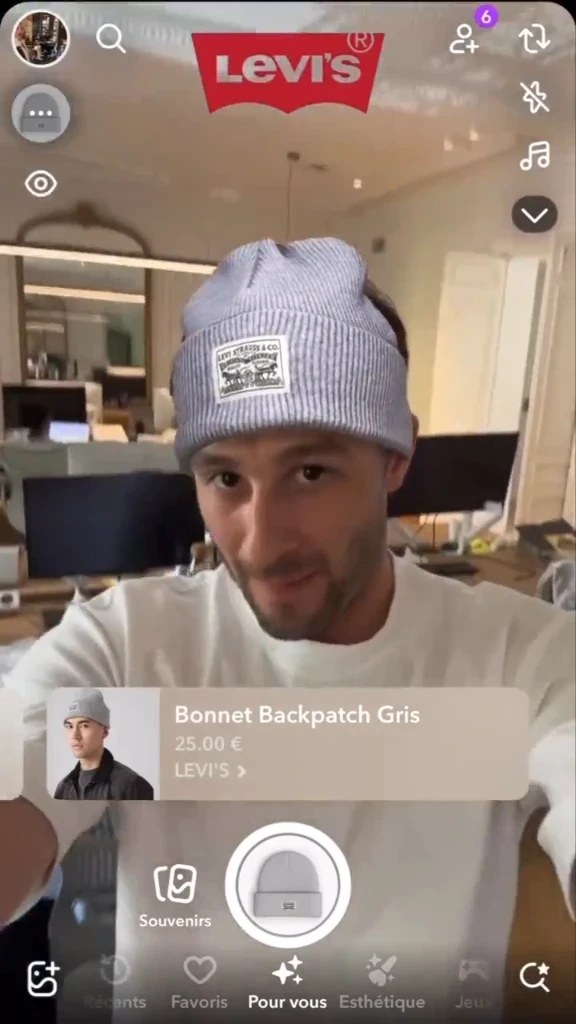
The full execution is available in Snapchat's Levi's case study.
The campaign changes again when the first interaction happens inside Chat rather than inside content.
Sponsored Snaps begin before the full-screen creative opens
Sponsored Snaps appear directly in Snapchat's Chat feed. Recipients can open the creative full-screen, return to Chat, reply, or follow a URL, and brands can also enable an auto-response.
The supplied specs use the familiar 9:16 at 720 × 1280, support MP4, MOV, JPG, and PNG, and allow creatives up to 180 seconds. Snapchat recommends keeping the actual Snap under 10 seconds.
Brands can also add a 1080 × 1920 branded Chat background, a message of up to 500 characters, and an optional auto-response.
The campaign therefore starts before the video does.
The Chat treatment needs to give someone a reason to open the Snap. The full-screen creative then needs to fulfill that expectation. If replies are enabled, the customer experience continues once the video has finished.
For Paid Marketing, this also creates an ownership question. Social, Community, Customer Support, or another team may need to know what happens when people reply before the campaign goes live.
AJIO treats Chat as part of the campaign
AJIO used Sponsored Snaps for its All Stars Sale in India. Snap reports that the campaign reached 56 million users in one day, added 28,000 followers, and generated 12% of the brand's paid-search landings during the measured period.
The useful lesson is the format behavior rather than the reach number alone. Sponsored Snap enters a different part of Snapchat, so the inbox appearance, opened creative, CTA, and possible response all belong to the same journey.
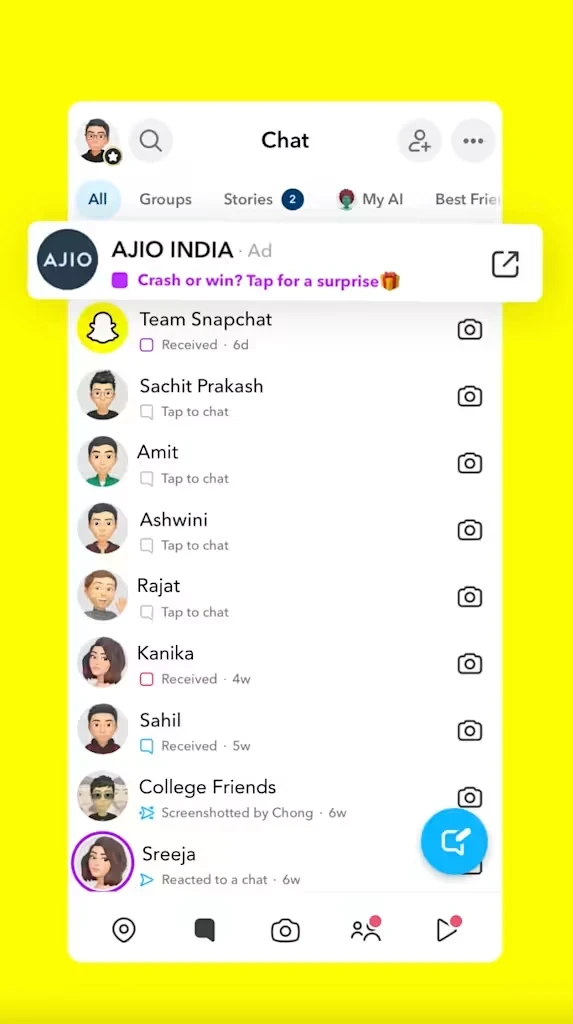
Check the full AJIO Sponsored Snap case study.
AR Lenses need their own creative brief
AR Lenses are interactive camera experiences rather than standard Snapchat video ads. Depending on the concept, production can involve interaction design, tracking, animation, 3D assets, Lens tooling, and testing across devices.
The extra work is worth it when the interaction helps the customer do something a normal image or video cannot.
Beauty can let someone preview a look. Eyewear can place frames on the customer's face. Fashion can let someone experience an accessory. Home products can appear inside the customer's environment.
AR is less useful when it only places a decorative effect around a message that could communicate just as well in video.
AMI Paris lets shoppers experience the handbag before buying it
AMI Paris used an AR Try-On Lens for its Paris Paris handbag.
Snap reports 14 million product try-ons, a 14-point lift in ad awareness, six-point lifts in brand favorability and recommendation intent, and six seconds of average Lens playtime.
For an E-commerce buyer, the interaction has a clear role in the buying journey. It helps the customer experience the product instead of simply viewing another fashion ad.

The AMI Paris AR case study shows the experience in action.
AR Filters belong in the production plan separately as well. Snapchat lists 945 × 2048 px PNG for static Filters and 720 × 1560 px GIF for moving Filters, with moving Filters running for one to three seconds.
Once the format has been chosen, Creative Ops can decide how much of the canvas is actually safe to use.
Set the safe zone after the format is locked
The 9:16 frame stays familiar across Snapchat. The usable space inside it changes.
Collection Ads introduce product tiles. Sponsored Snaps use Chat UI. App Install Ads can include attachment elements. AR introduces controls of its own.
For App Install Ads specifically, Snapchat says important graphics, logos, messaging, visual indicators, and legal copy should remain outside the top 150 px and bottom 330 px. Those dimensions should not become a universal Snapchat overlay.
The safer workflow is to lock the ad type and attachment first, then preview the creative inside the interface where it will actually run.
Keeping the product, logo, headline, CTA, and important claims flexible inside the master also makes late placement changes easier to absorb.
At higher volumes, repeating those checks manually across every product, market, and format creates another review layer. Encoding known requirements into brand and platform compliance checks can catch predictable issues earlier while leaving final composition and creative judgment with the team.
A flexible master also makes cross-platform work easier, as long as it remains a source rather than a universal finished asset.
Reuse the vertical master, not the final export
Snapchat, TikTok, and Instagram Reels can all begin from the same 9:16 source.
The overlap makes it tempting to finish one version and reuse the exact file everywhere. The interfaces make that risky.
A CTA that sits safely inside Reels can compete with Snapchat UI. A TikTok edit can rely on text placement that becomes crowded on Snapchat. A standard Snapchat layout can lose balance once Collection product tiles are added.
The stronger production model is one approved creative system feeding separate destination Adaptations.
Creative does not need to reconcept the campaign every time it reaches a new social platform. The final composition still needs enough flexibility for each destination to work properly.
Turn the Snapchat media plan into a creative and production matrix
A request for "Snapchat ads" hides too many decisions for Creative Ops to plan against. A useful campaign matrix might look like this:
Campaign need | Snapchat output |
|---|---|
One performance message | Single Image or Video Ad |
Three-step product story | Story sequence |
Four-product assortment | Collection Ad |
Catalog prospecting or retargeting | Dynamic Product Ads |
Six-second premium message | Standard Commercial |
Longer campaign film | Extended Play Commercial |
Direct Chat activation | Sponsored Snap |
Product try-on | AR Lens |
Branded camera treatment | AR Filter |
Multi-market rollout | Localized versions of the relevant formats |
Seeing the plan this way helps the team separate new creative thinking from repeatable Adaptation.
A different customer tension may deserve another creative hypothesis. Changing the product hierarchy in a Collection Ad may represent a real performance test. An AR Lens clearly introduces a new creative experience.
A shorter cut of the same approved film, another SKU, a localized version, or a platform-safe layout belongs to a different category of work.
Performance Marketing gets a cleaner view of how many ideas it is really testing. E-commerce can see where product and catalog inputs enter the campaign. Creative Ops gets a real production count before the requests begin reaching designers.
Once the matrix becomes large enough that every duration, product, market, and platform version is still being rebuilt manually, comparing creative automation services becomes useful because the real question is how much repetitive Production they remove.
Decide what is worth producing before you scale the campaign
Snapchat rarely creates the production bottleneck by itself. The workload grows when the same campaign is already moving across TikTok, Reels, Amazon, retailer media, several products, and multiple markets, while Snapchat introduces Stories, Collection Ads, Commercial cuts, Chat creative, and possibly AR.
Producing all of those assets faster only solves part of the problem.
The team still needs to decide which message deserves another test, which product benefit should lead, whether creative that performed elsewhere deserves to carry over, and where Snapchat needs a different treatment because the audience or interaction has changed.
We start before production.
We look at the audience, the brand, competitive creative, product priorities, previous performance, and the Snapchat formats in the media plan before deciding what is worth making. After all, the research only earns its place when it changes the work.
A performance signal may push one product benefit into the opening. Competitive creative may reveal a treatment the category has already overused. Audience context can change how much product explanation belongs in the ad. Format choice can determine whether the idea works best as one full-screen asset, a Story, a shopping experience, or AR.
Once those decisions are clear, AI Studio carries them through Production and Adaptation across the formats, products, languages, and markets the campaign needs. Human creative judgment stays involved where the work requires it, while review, feedback, versioning, brand requirements, and platform checks remain visible throughout.
For Performance Marketing, the result is a stronger set of creative tests rather than simply a larger asset count. E-commerce keeps product inputs closer to execution, while Creative Ops spends less time rebuilding predictable versions after the important decisions have already been made.
Performance from the live campaign can then inform what deserves to be created next.
Bring us a Snapchat campaign you are already planning. We look at the audience, existing creative, product context, previous performance, and planned formats before deciding what should carry over, what deserves another treatment, and what can move directly into Adaptation. |
The Snapchat ad specs should finish the plan, not start it
Snapchat's technical requirements become fairly straightforward once the format is clear. Most core units share the same vertical canvas, but they ask very different things from the customer.
A Single Image or Video Ad needs one clear idea. A Story needs progression. A Collection Ad needs deliberate product hierarchy. A Commercial needs to use its guaranteed attention well. A Sponsored Snap needs to work before and after the open. An AR Lens needs to give the customer a useful reason to participate.
Those decisions shape the creative. The Snapchat ad specs make sure the finished work can run.
Frequently asked questions
What are the Snapchat ad specs?
Most core Snapchat ad formats use 9:16 at 720 × 1280 px. Single Image or Video Ads, Story Ads, Collection Ads, and Sponsored Snaps accept MP4, MOV, JPG, or PNG. Commercials use H.264-encoded MP4 or MOV, while durations and interface requirements vary by format.
What size should a Snapchat ad be?
Snapchat lists 720 × 1280 px at a 9:16 aspect ratio for its primary full-screen formats. Creative teams can still keep a 1080 × 1920 source master when the campaign also needs TikTok, Reels, or other vertical Adaptations.
What are the Snapchat video ad specs?
A standard Snapchat Video Ad uses MP4 or MOV at 9:16 and 720 × 1280. Single Video Ads can run from 3 to 180 seconds.
What are the Snapchat Story Ad specs?
Story Ads use MP4, MOV, JPG, or PNG at 9:16 and 720 × 1280, with individual video assets from 3 to 180 seconds. Snapchat's documentation varies by setup on the number of Snaps supported, so the exact configuration should be confirmed in Ads Manager when the count affects Production.
What are the Snapchat Collection Ad specs?
Collection Ads use a 9:16 hero image or video at 720 × 1280 and combine it with four tappable product tiles. The hero should be composed around the shopping interface rather than treated like a standard full-screen video.
What are Snapchat Commercial Ads?
Standard Commercials last 3 to 6 seconds and remain non-skippable throughout. Extended Play Commercials run from 7 to 180 seconds, with the first six seconds non-skippable.
What are Sponsored Snap specs?
Sponsored Snaps use MP4, MOV, JPG, or PNG at 9:16 and 720 × 1280. They can run up to 180 seconds, although Snapchat recommends keeping the creative below 10 seconds. Brands can also add a 1080 × 1920 Chat background, message, and optional auto-response.
What are Snapchat safe zones?
Safe zones depend on the format and interface. For App Install Ads specifically, Snapchat says critical graphics, logos, messaging, visual indicators, and legal copy should remain outside the top 150 px and bottom 330 px. Other formats should be reviewed inside their actual UI because product tiles, Chat elements, attachments, and AR controls change the usable area.
What are the Snapchat AR Filter specs?
Static AR Filters use 945 × 2048 px PNG files. Moving Filters use 720 × 1560 px GIFs and run for 1 to 3 seconds.
What product image specs does Snapchat use for Dynamic Product Ads?
Snapchat product catalogs use WebP, JPEG, or PNG image URLs, with images at least 200 × 200 px. Product titles, descriptions, availability, pricing, identifiers, and destination links can also feed into the Dynamic Product Ad.
Can I use the same video for Snapchat, TikTok, and Instagram Reels?
A single 9:16 source master can support all three. The finished assets should still be adapted for each platform's interface, safe zones, format behavior, and creative context. Reuse the master, not blindly the final export.