LinkedIn ad specs guide (2026 update)
Article
Claron Kinny
|
Growth & Content
Video ads add duration and placement to the brief
LinkedIn supports several video aspect ratios:
Aspect ratio | Recommended production size |
|---|---|
16:9 landscape | 1920 × 1080 px |
1:1 square | Up to 1920 × 1920 px |
4:5 vertical | 720 × 900 px recommended |
9:16 vertical | 720 × 1280 px, up to 1080 × 1920 px |
LinkedIn currently recommends 4:5 for vertical feed video. Video ads must use MP4, H.264 or VP8, run below 30 FPS, and fall between 75 KB and 500 MB. Video duration can range from three seconds to 30 minutes.
That maximum duration is not the most useful production number. LinkedIn recommends uploading 15–30 second video ads when you want eligibility across the widest range of LinkedIn feed and LinkedIn Audience Network placements. Videos shorter than 30 seconds also loop until they have accumulated at least 30 seconds of playback.
An optional video thumbnail can be JPG or PNG up to 2 MB, and its aspect ratio and resolution should match the video. Captions use SRT files.
If the campaign is being cut specifically for LinkedIn, those requirements belong in the video brief before editing begins. If LinkedIn is one destination among several paid channels, the team can keep one approved master and produce placement-specific versions after that.
Rocketium's video ad production workflow covers that second stage.
Live example: H&M uses LinkedIn video for a corporate audience
H&M Group used Sponsored Video on LinkedIn to communicate its sustainability and innovation work to professional audiences. LinkedIn reports that the six-month campaign reached 530,000 unique members, added 5,000 followers from the target audience, and generated 69,000 engagements.
The example matters for consumer brands because LinkedIn does not have to carry the same job as Meta or TikTok. H&M's creative spoke to a corporate and professional audience rather than simply moving a consumer campaign onto another paid-social placement.
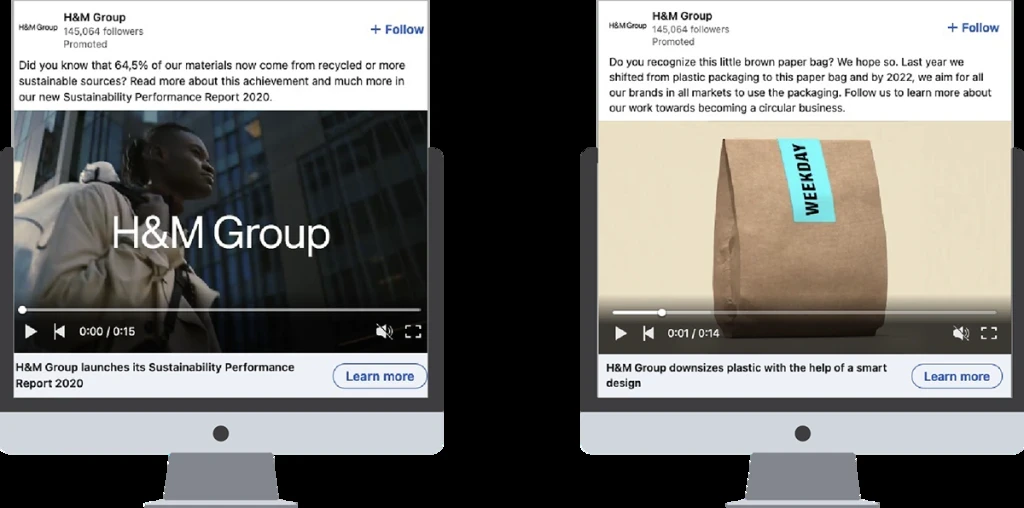
View the H&M LinkedIn video example
The same principle matters when a campaign runs outside the LinkedIn feed.
Check LinkedIn Audience Network before you approve the master
Single image ads, Carousel Ads, Document Ads, and video ads can extend beyond LinkedIn through the LinkedIn Audience Network. The same target audience, budget, and bid settings apply, but the creative may render differently across third-party apps and websites.
LinkedIn itself recommends keeping overlay text limited and titles shorter when Audience Network delivery is enabled because publisher layouts can adjust how the asset appears.
That makes placement part of creative QA.
An asset that looks balanced in the LinkedIn feed may have a different crop or text relationship on another publisher. If Audience Network is included in the ad set, Creative Ops should know before approving image hierarchy and on-image copy.
This is also where Rocketium's social media ad production becomes more useful than treating every final size as another design project.
Carousel Ads work when every card earns the next swipe
LinkedIn Carousel Ads use between 2 and 10 cards, with 1080 × 1080 px at 1:1 recommended for each card. Images can be JPG, PNG, or non-animated GIF, with a maximum file size of 10 MB per card. LinkedIn currently does not support video within Carousel Ads.
Introductory text should stay within 150 characters to reduce truncation, and each card headline displays for roughly two lines before shortening.
The useful production question is not how many cards Campaign Manager allows.
It is how many steps the argument needs.
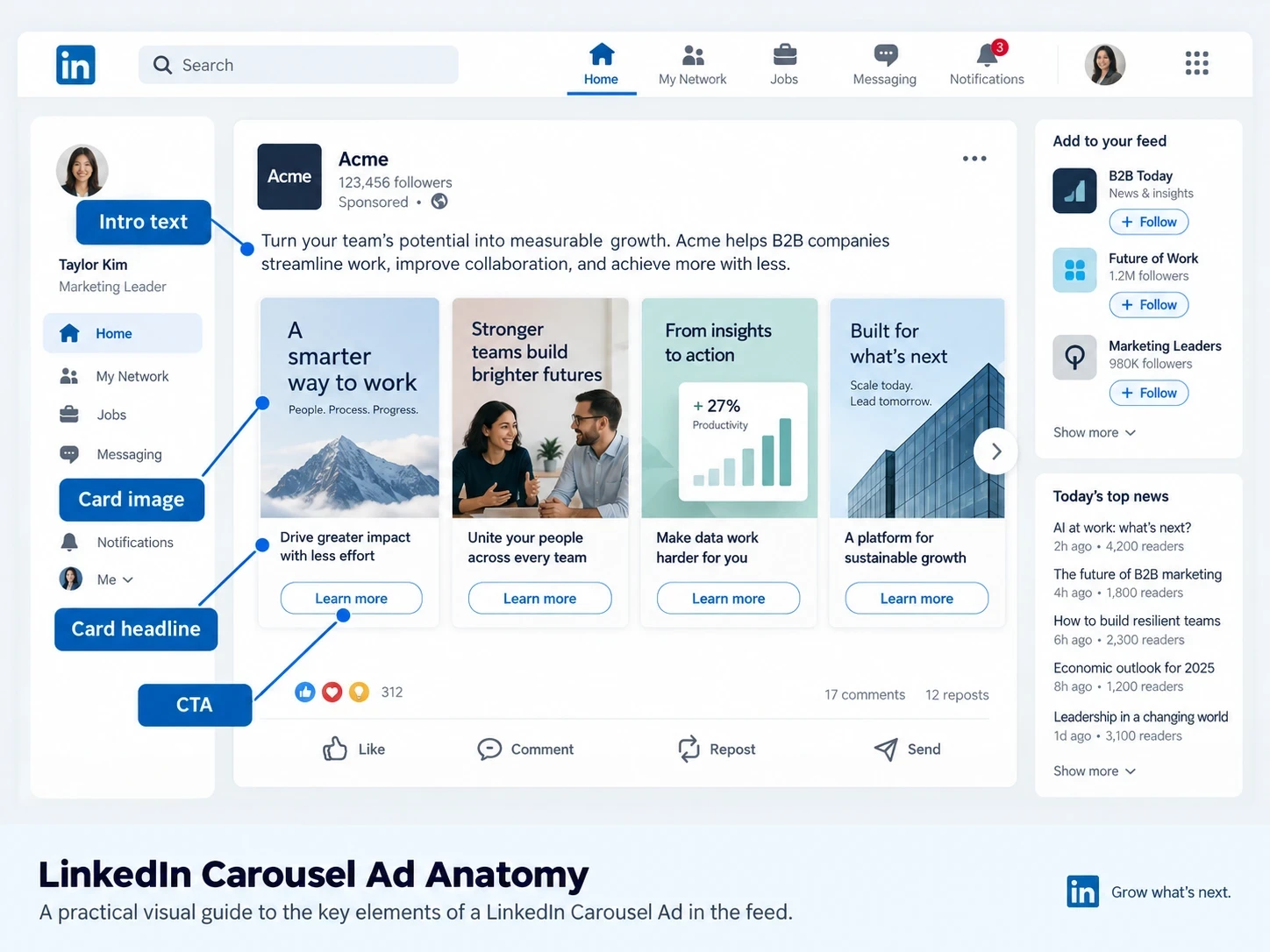
For a product portfolio, each card can introduce another product or use case. For employer branding, cards can move through people, benefits, and culture. For a lead-generation campaign, the sequence might move from problem to evidence to CTA.
If every card repeats the same message with a different stock image, the carousel adds production without adding much information.
For teams producing large sets of related variants, Rocketium's creative versioning guide covers how an approved master can branch into platform-specific formats without rebuilding the campaign idea.
The next format changes the creative job even more because the document itself becomes the ad.
Document Ads need to be designed for the feed
LinkedIn Document Ads support PDF, PPT/PPTX, and DOC/DOCX files up to 100 MB and 300 pages. For lead generation objectives, the document must be a PDF. Videos and animations inside the uploaded document display as static images, and multi-layer PDFs should be flattened.
Members can page through the document directly in the LinkedIn feed and download it. When a Lead Gen Form is attached, the advertiser can choose how many pages someone previews before they need to complete the form to unlock the rest.
That changes how a report, guide, or deck should be adapted for paid distribution.
The first page acts like ad creative. The next few pages have to carry enough value to make another swipe worthwhile. A document designed around print or desktop reading may meet the file specs while remaining difficult to scan inside a mobile feed.
See LinkedIn's Document Ad examples
Once the content already exists organically, however, the workflow changes again.
Thought Leader Ads start before the media buy
With Thought Leader Ads, the ad creative is the existing member post.
LinkedIn currently supports eligible single image, video, event, article, and newsletter posts for Thought Leader Ads under supported objectives. Advertisers need permission from the original content creator before sponsorship.
The advertiser cannot add separate introductory text, a new headline, or a CTA button to the Thought Leader Ad. Any edits need to happen through the original author's post.
That makes the organic post part of paid-media production.
If a VP's video has a slow opening, the paid team cannot repair it later with an ad headline. If the post copy buries the point, Campaign Manager cannot add a new introductory layer.
For Creative Ops, the implication is straightforward: content that may later become a Thought Leader Ad should be briefed with paid distribution in mind before publishing.
Live example: Nextiva turns executive content into paid creative
Nextiva took longer expert interviews and cut them into shorter videos featuring senior leaders, then promoted the organic posts through Thought Leader Ads. LinkedIn reports that its influenced sales pipeline increased 5,600% over several months of the program.
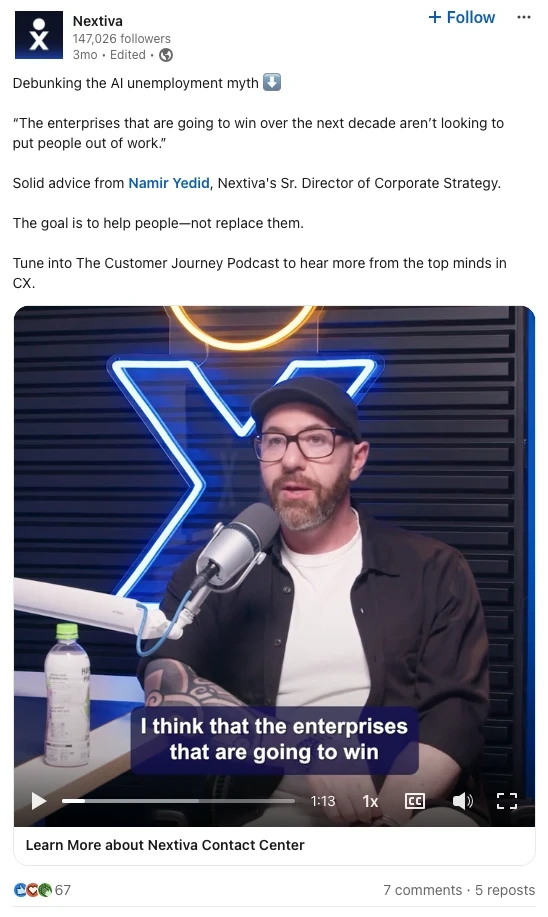
View the Nextiva Thought Leader Ad example
Thought Leader Ads still live in the feed. Sponsored Messaging shifts the creative into a completely different environment.
Message and Conversation Ads are copy and flow problems first
Message Ads appear inside LinkedIn Messaging on desktop and mobile devices.
Current Message Ad specs allow:
Field | LinkedIn spec |
|---|---|
Ad name | Up to 255 characters |
Subject | Up to 60 characters |
Message text | Up to 1,500 characters |
Hyperlinked text | Up to 70 characters |
CTA | Up to 20 characters |
Landing page URL | Up to 1,024 characters, with http:// or https:// |
Optional banner | 300 × 250 px, desktop only, 2 MB max |
Message Ads can also use personalization fields such as first name, company name, job title, or industry. When the lead generation objective is selected, the message can connect to a Lead Gen Form.
Conversation Ads let the user choose between different calls to action and follow branching message paths. The intro message can run to 8,000 characters, each CTA can use up to 25 characters, and the format can show up to five CTA buttons in one message.
LinkedIn also supports an optional 300 × 250 desktop banner and a 250 × 250 image within the message flow.
The banner should stay supportive because users on mobile devices may never see it.
The actual creative system is the conversation:
What does the first message say? Which action does each CTA represent? What happens after each click?
Live example: Trustpilot connects video, Thought Leader Ads, and Conversation Ads
Trustpilot used video ads for awareness, Thought Leader Ads to build credibility, and Conversation Ads later in the journey. LinkedIn reports that the combined approach produced 2.7x ROAS, while audiences exposed to the thought-leadership layer showed 15x higher engagement and a 229% lift in Lead Gen Form completions.
Other LinkedIn formats depend even more heavily on existing profile and Page data.
Dynamic Ads use LinkedIn profile data inside the ad
Dynamic Ads appear in the desktop right rail and can personalize the experience using a member's LinkedIn profile data.
Follower Ads encourage someone to follow a LinkedIn Page. The current specs allow a 70-character description, 50-character headline, company names up to 25 characters, and a company logo of at least 100 × 100 px in JPG or PNG. The CTA changes depending on whether the member already follows the Page and can include options such as Visit company, Visit jobs, or Visit life.
Spotlight Ads send someone to a website or landing page and can also personalize around profile photo, company name, or job title. The format uses a 100 × 100 company image, a headline up to 50 characters, a description up to 70, a CTA up to 18 characters, and can include an optional custom background at exactly 300 × 250 px and 2 MB or less.
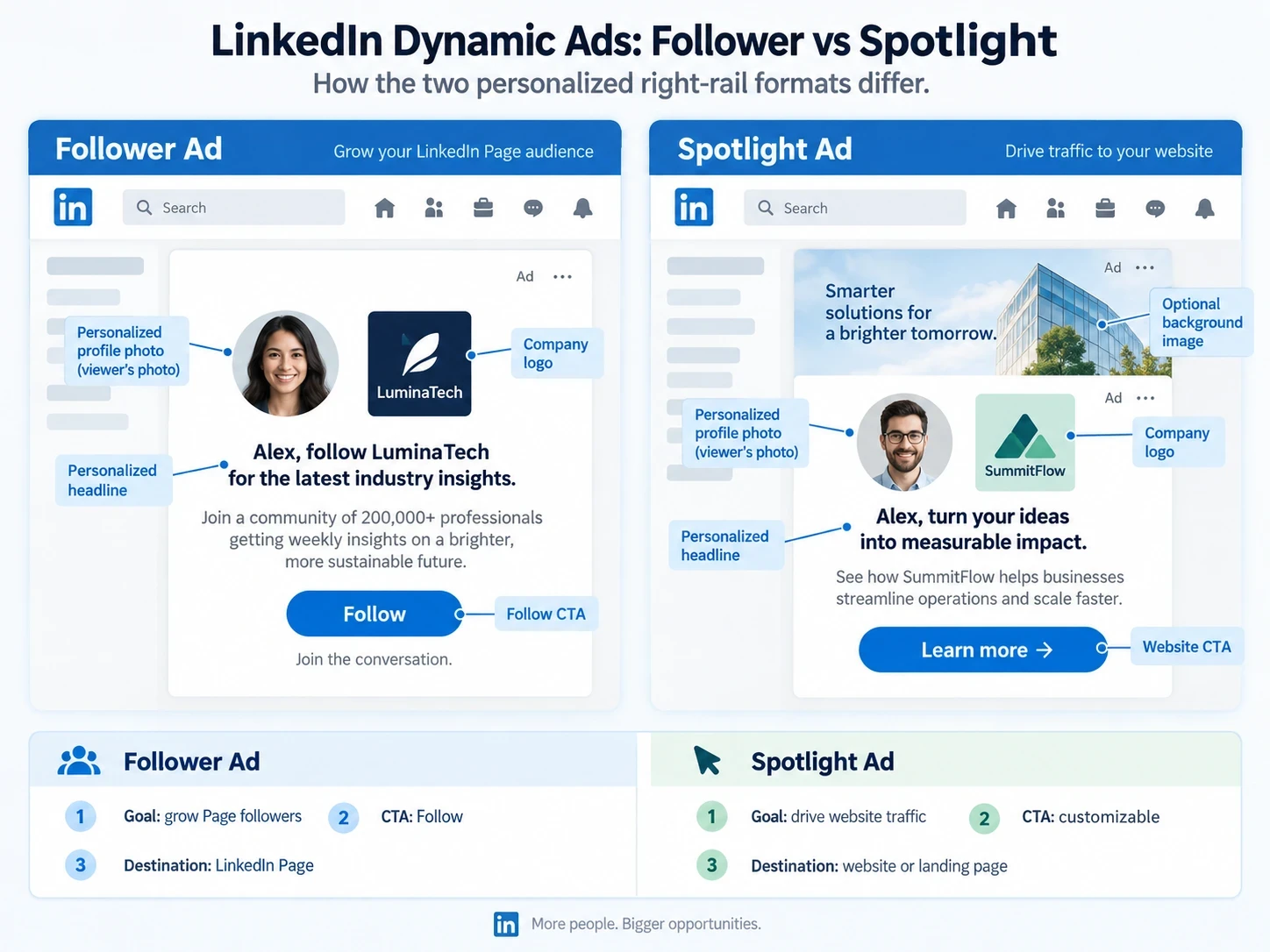
This is one place where a generic paid-social template doesn't help much. The LinkedIn Page, company logo, profile information, and destination behavior all become part of the rendered ad.
Text Ads reduce the production problem to a few words
Text Ads appear primarily in LinkedIn's desktop right rail.
Their current specs are compact:
100 × 100 px JPG or PNG
2 MB maximum image size
Headline up to 25 characters
Description up to 75 characters
Ad name optional, up to 255 characters
At that size, the thumbnail has limited room to do the selling.
For a performance team, testing several materially different headlines is likely to tell you more than asking design for another round of 100 × 100 imagery.
Event and newsletter formats flip the problem again because much of the creative already exists before Campaign Manager is opened.
Event and Newsletter Ads inherit the original content
Event Ads can promote a LinkedIn Event or, as of 2026, supported off-platform events. They run across desktop and mobile devices and can change their presentation before, during, and after the event.
LinkedIn currently allows introductory text up to 600 characters, an optional event image, and an optional 30-second video preview for LinkedIn Live events. The same introductory text may appear before, during, and after the event, so either write it to work across all three stages or plan separate campaigns.
Article and Newsletter Ads promote native long-form content already published on LinkedIn. Both use the original post's image, which means the cover image and headline have to work for paid distribution before the ad is created.
For consumer brands using LinkedIn for corporate communications, employer branding, retailer relationships, or thought leadership, these formats can be more relevant than trying to make every campaign look like a conventional display ad.
When the campaign moves onto television inventory, the asset requirements change again.
CTV Ads need their own video master
LinkedIn Connected TV ads use a 16:9, 1920 × 1080 video master.
Current CTV specs call for MP4 with H.264, six to 60 seconds of video, up to 500 MB, a constant frame rate from the accepted broadcast values, and a recommended bitrate between 15 and 40 Mbps. LinkedIn also publishes separate audio requirements for CTV delivery.
CTV delivery uses LinkedIn Audience Network inventory, so it should be treated as a separate production output rather than a compressed version of a LinkedIn feed video.
If CTV is part of the media plan, put it into the brief before the video master is approved.
Turn the format list into one production matrix
By now, "we need LinkedIn ads" is clearly not enough information for Creative Ops.
One campaign could require:
Campaign need | Required production |
|---|---|
Feed awareness | Square and vertical single image variants |
Video | 4:5 and 16:9 versions |
Product or proof-point sequence | Carousel |
Guide or report | Document Ad |
Executive amplification | Thought Leader Ad |
Direct response | Message or Conversation Ad |
Page growth | Follower Ad |
Personalized traffic | Spotlight Ad |
Event registrations | Event Ad |
Long-form distribution | Article / Newsletter Ad |
Connected TV | Separate 1920 × 1080 master |
The concept can remain consistent while the format-specific outputs change. That is the point where a good creative brief should separate what is being tested from what has to be adapted.
If Paid Marketing wants three messages across two professional audiences, the team first decides which messages are genuine tests. Creative Ops can then map those approved concepts into square, vertical, video, carousel, and other required outputs.
Rocketium's creative automation services guide covers the different options that take more of the repeatable output work off the internal queue.
For global campaigns, the same asset matrix grows again once copy, product claims, and layouts change by market. The creative localization guide covers that layer separately.
"LinkedIn campaign" is not a production spec. "Three single image concepts in square and vertical, two 4:5 video versions, one Document Ad, two Thought Leader posts, and one Message Ad for a lead-generation objective" is. That is the level of detail Creative Ops needs before production starts. |
Once the concept is approved, the remaining work becomes Adaptation
For one LinkedIn campaign, a designer can manually produce the square image, vertical variation, video cut, Carousel cards, and messaging banner.
The workload changes when the same campaign has to cover several product lines, professional audiences, markets, and paid channels.
The campaign idea has already been decided. Much of the remaining work is Adaptation: taking the approved master and producing the correct sizes and versions while preserving brand rules and each destination's requirements.
Rocketium's social media ad production workflow handles platform-specific versions from approved masters, while brand and platform compliance checks help validate output requirements before human review.
The boundary matters.
Writing a LinkedIn headline that works within the first 70 characters still needs judgment. Deciding whether H&M should speak differently to a professional audience than it does on Instagram still needs marketing judgment.
Rebuilding the approved visual into another aspect ratio is a different kind of work.
NIVEA offers a useful production example outside LinkedIn. Rocketium reports that its e-commerce teams produced more than 700 assets in six months, reduced banner turnaround from one to two days to roughly two to three hours, and cut platform rejections by 98%.
The lesson is about the production model rather than LinkedIn performance. Once several platforms each have their own rules, reducing repetitive adaptation and correction cycles gives the team more room for the work that still requires human judgment.
If LinkedIn assets regularly reach the queue after Meta, TikTok, retailer media, and PDP work, take one campaign you've already completed and compare the production path. Use the same approved master and measure internal hours, review rounds, output accuracy, and time to final assets. |
Build for the LinkedIn format people will actually see
The best LinkedIn ad spec sheet does more than prevent an upload error.
It tells Paid Marketing what Campaign Manager needs before the brief moves downstream, gives Creative Ops the complete asset matrix, and makes clear which creative decisions belong to the format itself.
For single image ads, that means choosing the right aspect ratio and writing for the copy people can see before truncation.
For Document Ads, the cover and opening pages become paid creative.
For Thought Leader Ads, the organic post has to be ready for sponsorship before it is published.
For Sponsored Messaging, the message path matters more than the optional banner.
Once those decisions are made early, the production spec becomes much easier to execute.
Frequently asked questions
What are the LinkedIn ad specs?
LinkedIn ad specs vary by format. Single image ads commonly use 1200 × 1200 px square or 1200 × 628 px landscape images. Video supports 16:9, 1:1, 4:5, and 9:16. Carousel Ads use 2–10 square cards at 1080 × 1080 px, while Document Ads support files up to 100 MB and 300 pages. Sponsored Messaging, Dynamic Ads, Event Ads, Thought Leader Ads, and CTV Ads each have separate requirements.
What are the LinkedIn single image ad specs?
LinkedIn recommends 1200 × 628 px for landscape, 1200 × 1200 px for square, and 720 × 900 px for 4:5 vertical images. JPG, PNG, and GIF are supported with a 5 MB maximum file size. Square and landscape deliver across desktop and mobile, while paid vertical images serve on mobile.
How much introductory text can a LinkedIn ad have?
Single image ads can contain up to 3,000 characters of introductory text, but LinkedIn recommends staying within 150 characters to reduce truncation. Headlines can reach 200 characters, with 70 recommended to avoid shortening on most placements.
What are the LinkedIn video ad specs?
LinkedIn video ads support 16:9, 1:1, 4:5, and 9:16. Files must be MP4, between 75 KB and 500 MB, and can run from three seconds to 30 minutes. LinkedIn recommends 15–30 seconds when broad LinkedIn feed and Audience Network eligibility matters.
What are the LinkedIn Carousel Ad specs?
Carousel Ads contain 2–10 cards. LinkedIn recommends 1080 × 1080 px at 1:1, with each image up to 10 MB. JPG, PNG, and non-animated GIF are supported, while video is not currently supported within the Carousel format.
What are LinkedIn Document Ads?
Document Ads let advertisers promote PDF, PowerPoint, or Word content directly in the LinkedIn feed and LinkedIn Audience Network. Files can be up to 100 MB and 300 pages. Lead-generation Document Ads require a PDF and can use a Lead Gen Form to gate part of the document.
What are Thought Leader Ads?
Thought Leader Ads sponsor an eligible existing LinkedIn member post. The advertiser cannot add a separate headline, introductory text, or CTA button, so the original post itself becomes the paid creative.
What is the difference between Message Ads and Conversation Ads?
Message Ads deliver one sponsored message through LinkedIn Messaging, with a subject, message body, CTA, and optional desktop banner. Conversation Ads let the user choose among CTA buttons that can open landing pages, Lead Gen Forms, or another message branch.
Do LinkedIn ads run on the LinkedIn Audience Network?
Single image, Carousel, Document, and video ad sets can use LinkedIn Audience Network where available. Creative may render differently across publisher apps and websites, so LinkedIn recommends keeping overlay copy limited and titles concise.
What are the LinkedIn CTV ad specs?
LinkedIn recommends 1920 × 1080 px at 16:9 for CTV Ads. Files use MP4 with H.264, can run from six to 60 seconds, and can be up to 500 MB. LinkedIn also specifies broadcast-oriented frame rate, bitrate, and audio requirements for CTV inventory.