
Updated On:
Rich media banner ads with 7 formats and live examples
Rich media banner ads with 7 formats and live examples
Written By

" height="20px" id="fXPtLeYUp" width="20px"/></svg>)
Growth Marketer
Reviewed By

Co-founder and CEO

Rich media banner ads give people something to do inside an ad before they leave the placement. Depending on the format, someone might rotate a product, browse several items, expand the ad for more information, play a short game, try a product virtually, or receive an experience that changes based on their input.
That interaction is the important distinction.
The Interactive Advertising Bureau (IAB) defines rich media as advertising that users can interact with, rather than creative that is simply animated. Google uses a broader practical definition, describing rich media as digital advertising that can include video, audio, games, expansion, and other elements designed to increase interaction with the content.
For a marketer, however, knowing the definition is only the starting point. The more useful question is what the interaction allows a customer to understand, explore, experience, or choose that a standard display ad cannot do as effectively.
That is how the seven formats in this guide are organized.
Key takeaways
01
Rich media is most useful when the interaction improves the customer's ability to understand, explore, experience, compare, or choose the product.
02
Interactive motion and 3D work when movement reveals useful product detail. Carousels and scrollers work when one frame cannot carry the assortment, while expandable banners create room for deeper information.
03
Playables work when participation belongs naturally to the campaign idea. AR and virtual try-on are stronger when they reduce purchase uncertainty, particularly in visual categories such as beauty, fashion, jewelry, and eyewear.
04
Rich media should not be evaluated only on interaction rate. The interaction metric explains what happened inside the ad, while CPA, conversion, ROAS, revenue, or brand lift still determines whether the campaign delivered the intended result.
05
The interactive unit is rarely the entire production job. A rich media campaign can also require fallback creative, standard display assets, video, paid social, retail media, product variants, and localized versions.
06
Publisher, DSP, ad-server, browser, and mobile-app requirements can affect the build, so the media inventory should be confirmed before the rich media concept is finalized.
Rich media banner ads give people something to do inside an ad before they leave the placement. Depending on the format, someone might rotate a product, browse several items, expand the ad for more information, play a short game, try a product virtually, or receive an experience that changes based on their input.
That interaction is the important distinction.
The Interactive Advertising Bureau (IAB) defines rich media as advertising that users can interact with, rather than creative that is simply animated. Google uses a broader practical definition, describing rich media as digital advertising that can include video, audio, games, expansion, and other elements designed to increase interaction with the content.
For a marketer, however, knowing the definition is only the starting point. The more useful question is what the interaction allows a customer to understand, explore, experience, or choose that a standard display ad cannot do as effectively.
That is how the seven formats in this guide are organized.
Key takeaways
01
Rich media is most useful when the interaction improves the customer's ability to understand, explore, experience, compare, or choose the product.
02
Interactive motion and 3D work when movement reveals useful product detail. Carousels and scrollers work when one frame cannot carry the assortment, while expandable banners create room for deeper information.
03
Playables work when participation belongs naturally to the campaign idea. AR and virtual try-on are stronger when they reduce purchase uncertainty, particularly in visual categories such as beauty, fashion, jewelry, and eyewear.
04
Rich media should not be evaluated only on interaction rate. The interaction metric explains what happened inside the ad, while CPA, conversion, ROAS, revenue, or brand lift still determines whether the campaign delivered the intended result.
05
The interactive unit is rarely the entire production job. A rich media campaign can also require fallback creative, standard display assets, video, paid social, retail media, product variants, and localized versions.
06
Publisher, DSP, ad-server, browser, and mobile-app requirements can affect the build, so the media inventory should be confirmed before the rich media concept is finalized.
Rich media changes what the customer can do inside the ad
Standard display and rich media can occupy similar media inventory, but they give the customer very different experiences.
| Standard display | Rich media | |
|---|---|---|
| Customer can | View and click | Explore, expand, play, browse, try, or interact |
| Creative can include | Static or simple animated creative | Multiple media types and interactive behavior |
| Useful signals | Impressions, clicks | Interactions plus campaign outcomes |
| Production model | Standard size and format set | Specialist interactive build plus supporting assets |
| Standard display | Rich media | |
|---|---|---|
| Customer can | View and click | Explore, expand, play, browse, try, or interact |
| Creative can include | Static or simple animated creative | Multiple media types and interactive behavior |
| Useful signals | Impressions, clicks | Interactions plus campaign outcomes |
| Production model | Standard size and format set | Specialist interactive build plus supporting assets |
| Standard display | Rich media | |
|---|---|---|
| Customer can | View and click | Explore, expand, play, browse, try, or interact |
| Creative can include | Static or simple animated creative | Multiple media types and interactive behavior |
| Useful signals | Impressions, clicks | Interactions plus campaign outcomes |
| Production model | Standard size and format set | Specialist interactive build plus supporting assets |
Google’s current HTML5 documentation makes a similar distinction. A standard HTML5 display creative primarily sends a user to the advertiser’s site, while rich media can include interactive galleries, games, embedded video, expandable experiences, data-driven creative, and other richer behaviors.
This distinction matters because the seven rich media banner ad formats below should not be treated as seven more decorative options for the media plan. Each one gives the customer a different capability.
7 rich media banner ad formats and when to use each
| Rich media format | What it lets the customer do | Best suited for |
|---|---|---|
| Interactive motion and 3D | Examine or manipulate a product | Product launches, visually detailed products |
| Carousel or scroller | Browse several products or messages | Collections, ranges, multi-product launches |
| Expandable banner | Open more information | Comparisons and considered purchases |
| Playable ad | Participate in the campaign | Gaming and entertainment-led campaigns |
| AR or virtual try-on | Experience the product personally | Beauty, fashion, jewelry, eyewear |
| Personalized interactive | Change the output through input | Guided discovery and personalization |
| Interstitial | Give the campaign most or all of the screen | High-impact launches and natural content breaks |
| Rich media format | What it lets the customer do | Best suited for |
|---|---|---|
| Interactive motion and 3D | Examine or manipulate a product | Product launches, visually detailed products |
| Carousel or scroller | Browse several products or messages | Collections, ranges, multi-product launches |
| Expandable banner | Open more information | Comparisons and considered purchases |
| Playable ad | Participate in the campaign | Gaming and entertainment-led campaigns |
| AR or virtual try-on | Experience the product personally | Beauty, fashion, jewelry, eyewear |
| Personalized interactive | Change the output through input | Guided discovery and personalization |
| Interstitial | Give the campaign most or all of the screen | High-impact launches and natural content breaks |
| Rich media format | What it lets the customer do | Best suited for |
|---|---|---|
| Interactive motion and 3D | Examine or manipulate a product | Product launches, visually detailed products |
| Carousel or scroller | Browse several products or messages | Collections, ranges, multi-product launches |
| Expandable banner | Open more information | Comparisons and considered purchases |
| Playable ad | Participate in the campaign | Gaming and entertainment-led campaigns |
| AR or virtual try-on | Experience the product personally | Beauty, fashion, jewelry, eyewear |
| Personalized interactive | Change the output through input | Guided discovery and personalization |
| Interstitial | Give the campaign most or all of the screen | High-impact launches and natural content breaks |
Rich media changes what the customer can do inside the ad
Standard display and rich media can occupy similar media inventory, but they give the customer very different experiences.
| Standard display | Rich media | |
|---|---|---|
| Customer can | View and click | Explore, expand, play, browse, try, or interact |
| Creative can include | Static or simple animated creative | Multiple media types and interactive behavior |
| Useful signals | Impressions, clicks | Interactions plus campaign outcomes |
| Production model | Standard size and format set | Specialist interactive build plus supporting assets |
Google’s current HTML5 documentation makes a similar distinction. A standard HTML5 display creative primarily sends a user to the advertiser’s site, while rich media can include interactive galleries, games, embedded video, expandable experiences, data-driven creative, and other richer behaviors.
This distinction matters because the seven rich media banner ad formats below should not be treated as seven more decorative options for the media plan. Each one gives the customer a different capability.
7 rich media banner ad formats and when to use each
| Rich media format | What it lets the customer do | Best suited for |
|---|---|---|
| Interactive motion and 3D | Examine or manipulate a product | Product launches, visually detailed products |
| Carousel or scroller | Browse several products or messages | Collections, ranges, multi-product launches |
| Expandable banner | Open more information | Comparisons and considered purchases |
| Playable ad | Participate in the campaign | Gaming and entertainment-led campaigns |
| AR or virtual try-on | Experience the product personally | Beauty, fashion, jewelry, eyewear |
| Personalized interactive | Change the output through input | Guided discovery and personalization |
| Interstitial | Give the campaign most or all of the screen | High-impact launches and natural content breaks |
1. Interactive motion and 3D ads help people explore the product
Interactive motion becomes useful when movement tells the customer something about the product rather than simply making the banner more noticeable.
Google currently supports rich media features including in-banner video, fullscreen expandable creative, parallax effects, and 3D Swirl experiences through its rich media ecosystem.
For a product launch, that might mean letting someone rotate the item, inspect the packaging, understand its shape, or explore details that are difficult to communicate through one static pack shot.
Example: Lancôme lets shoppers inspect the mascara in 3D
Lancôme used Google's 3D Swirl format to launch Lash Idôle Mascara in the UAE and Saudi Arabia. Instead of simply showing the product, the experience allowed shoppers to zoom, rotate, and expand the mascara from their phones.
Google reports that the campaign generated a 5X increase in engagement rate and a 6X increase in viewable engagement rate, while cost per engagement came in 58% below Google's average benchmark for rich media display ads.
Watch the Lancôme 3D Swirl video
The useful lesson is not that every product needs 3D. Lancôme used it because being able to "handle" the mascara digitally added information that another still image would not have provided as effectively.
If the campaign already communicates effectively through motion and the larger problem is producing the required lengths, aspect ratios, markets, and placements around it, that becomes a video ad production problem rather than another interactive build.
2. Carousels and scrollers help shoppers browse more products or messages
A single display frame forces the campaign to choose one visual state. A carousel or scroller creates room for several products, benefits, messages, or stages while keeping the shopper inside the placement.
This makes the format useful for collections, colorways, flavors, ranges, and launches where seeing more of the assortment contributes to the decision.
The additional panels still need a job. If every movement reveals essentially the same message over another photograph, the interaction has increased production without increasing customer value.
Example: McDonald's gives a larger launch more room with a branded carousel
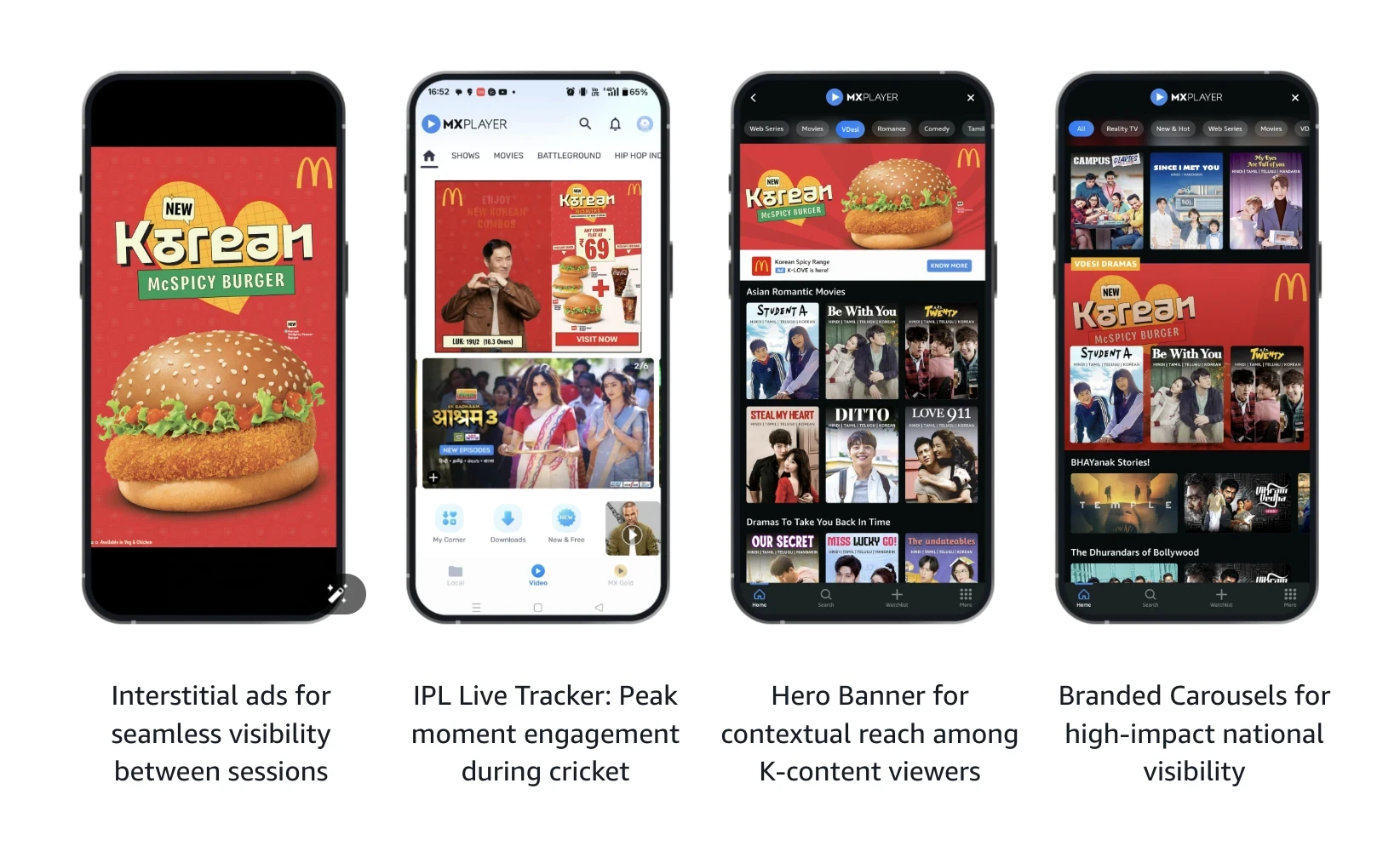
McDonald's used a branded carousel as the centerpiece of its Korean-inspired menu launch on Amazon MX Player in India. Amazon says the placement held a fixed premium homepage position for four weeks and was designed to create broad awareness for the national launch.
The branded carousel generated more than 163 million impressions and reached 38 million users during the campaign.
See the McDonald's Amazon MX Player campaign
The format makes sense because the campaign has more to show than a single hero product. Creative Ops can use each state to introduce another product, another part of the range, or another useful piece of the launch story.
When that same campaign also needs retailer and paid-social assets, the approved system can move into retail media creative production and social media ad adaptation without asking the interactive team to rebuild the surrounding campaign.
3. Expandable banners give shoppers more information before they click
Expandable banners begin inside a standard display footprint and open into a larger canvas after the customer interacts.
That additional space can support a product comparison, feature breakdown, gallery, demonstration, configuration tool, or another piece of information that would otherwise require an immediate trip to the landing page.
Display & Video 360 currently lists common patterns such as a 300 × 250 unit expanding to 600 × 300 and a 728 × 90 leaderboard expanding to 728 × 300. Expansion can only happen after a click or hover, and publishers can choose whether to accept expandable inventory at all.
See current Google expandable creative requirements
For a considered purchase, the collapsed unit might introduce the product and proposition, while the expanded state lets someone compare three versions or understand a feature in more detail.
Simply making the campaign artwork larger does not make much use of the format.
The placement should be confirmed before Creative Ops approves the expanded layout. Google notes that expansion direction and available inventory can vary, and expandable creatives in Display & Video 360 currently require manual review that typically takes about one business day.
4. Playable ads work when participation belongs to the campaign idea
Playable ads ask the audience to complete a small action inside the advertising experience. That may involve matching, tapping, racing, choosing, collecting, solving, or another simple mechanic.
The strongest playables connect that behavior directly to the idea being advertised.
Example: KitKat turns "Have a Break" into something people can play
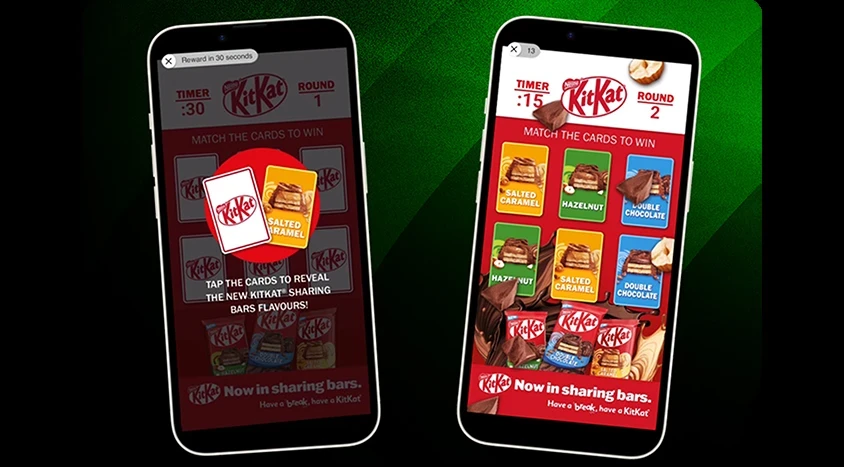
KitKat partnered with Candy Crush Saga to bring its "Have a Break" positioning into a setting already associated with short moments of entertainment.
One of the experiences asked users to match KitKat flavor cards. Across the broader activation, Microsoft reports more than 500 million impressions, 6.9 million clicks, and a completion rate above 97%. Measured brand lift included gains in ad recall, awareness, consideration, and purchase intent.
See the KitKat and Candy Crush campaign
The idea works because participation is not an unrelated layer added to the advertisement. Both the brand platform and the media environment already revolve around taking a short break, so play becomes part of the message.
A playable for a product that customers mainly need to compare on specifications would have a higher bar to clear.
3. Expandable banners give shoppers more information before they click
Expandable banners begin inside a standard display footprint and open into a larger canvas after the customer interacts.
That additional space can support a product comparison, feature breakdown, gallery, demonstration, configuration tool, or another piece of information that would otherwise require an immediate trip to the landing page.
Display & Video 360 currently lists common patterns such as a 300 × 250 unit expanding to 600 × 300 and a 728 × 90 leaderboard expanding to 728 × 300. Expansion can only happen after a click or hover, and publishers can choose whether to accept expandable inventory at all.
See current Google expandable creative requirements
For a considered purchase, the collapsed unit might introduce the product and proposition, while the expanded state lets someone compare three versions or understand a feature in more detail.
Simply making the campaign artwork larger does not make much use of the format.
The placement should be confirmed before Creative Ops approves the expanded layout. Google notes that expansion direction and available inventory can vary, and expandable creatives in Display & Video 360 currently require manual review that typically takes about one business day.
4. Playable ads work when participation belongs to the campaign idea
Playable ads ask the audience to complete a small action inside the advertising experience. That may involve matching, tapping, racing, choosing, collecting, solving, or another simple mechanic.
The strongest playables connect that behavior directly to the idea being advertised.
Example: KitKat turns "Have a Break" into something people can play
KitKat partnered with Candy Crush Saga to bring its "Have a Break" positioning into a setting already associated with short moments of entertainment.
One of the experiences asked users to match KitKat flavor cards. Across the broader activation, Microsoft reports more than 500 million impressions, 6.9 million clicks, and a completion rate above 97%. Measured brand lift included gains in ad recall, awareness, consideration, and purchase intent.
See the KitKat and Candy Crush campaign
The idea works because participation is not an unrelated layer added to the advertisement. Both the brand platform and the media environment already revolve around taking a short break, so play becomes part of the message.
A playable for a product that customers mainly need to compare on specifications would have a higher bar to clear.
5. AR and virtual try-on ads help customers experience the product
Some interactive formats add value because they reduce uncertainty before purchase.
That makes AR and virtual try-on particularly relevant to beauty, fashion, jewelry, eyewear, and similar categories where appearance can influence the decision.
Example: Dior lets shoppers try lipstick shades before buying
Christian Dior Parfums added Google's AR Beauty Try On technology to its Dior Addict Lipstick campaign across Saudi Arabia, the UAE, Kuwait, and Qatar.
Shoppers could first explore shades on models and then use their own phone camera to see the product on themselves. Google reports that the campaign reached more than four million people in 21 days, while 41% of consumers clicked at least one shade in the try-on panel. The different lipstick shades were tried more than 400,000 times.
See the Dior AR Beauty Try On campaign
For an e-commerce team, the reason to consider the format is clearer than a generic engagement argument. The interaction helps answer a real purchase question: How might this product look on me?
6. Personalized interactive ads change with the customer's input
Personalization becomes more meaningful when the customer contributes something and the creative responds to that choice.
That is different from changing a product or headline based only on an audience segment. The interaction itself becomes part of discovery.
Example: Indriya turns bridal jewelry discovery into a personalized experience
Indriya's "Be the Bride of Your Dreams" campaign allowed users to select a bridal tradition and generate a photorealistic bridal portrait featuring jewelry from one of the brand's four collections.
The campaign appeared in the 2026 Indian Digital Marketing Awards category for rich media banners and generated 22.3 million impressions, 701,000 bridal images, and 106,000 downloads.
See the Indriya campaign case study
The interaction matters because the shopper receives an output that changes according to her choice. Rather than simply viewing another jewelry ad, she can place herself inside a specific bridal aesthetic and discover products in that context.
7. Interstitials give the campaign full-screen attention at a natural break
Interstitials sit slightly apart from the previous formats because the main change is how much of the screen the creative occupies and when it appears.
Google describes interstitial rich media as creative that can float over page content or appear full-screen at natural transition points in mobile apps, including launch, loading, and video pre-roll moments.
For richer interactive interstitials, Google recommends giving the viewer a clear close control. Its developer guidance also recommends closing an interstitial after 15 seconds if the viewer has not interacted with it.
Example: McDonald's shows why the transition point matters
The McDonald's Amazon MX Player campaign also used full-screen interstitial display placements between streaming sessions.
Amazon reports that these placements generated 4.8 million impressions at a 1.3% CTR, which was 30% above the benchmark Amazon used for the campaign.
This example demonstrates the placement behavior rather than a bespoke interactive mechanic. The useful lesson is that full-screen attention becomes easier to justify when the ad appears between content sessions instead of interrupting the viewer halfway through one.
5. AR and virtual try-on ads help customers experience the product
Some interactive formats add value because they reduce uncertainty before purchase.
That makes AR and virtual try-on particularly relevant to beauty, fashion, jewelry, eyewear, and similar categories where appearance can influence the decision.
Example: Dior lets shoppers try lipstick shades before buying
Christian Dior Parfums added Google's AR Beauty Try On technology to its Dior Addict Lipstick campaign across Saudi Arabia, the UAE, Kuwait, and Qatar.
Shoppers could first explore shades on models and then use their own phone camera to see the product on themselves. Google reports that the campaign reached more than four million people in 21 days, while 41% of consumers clicked at least one shade in the try-on panel. The different lipstick shades were tried more than 400,000 times.
See the Dior AR Beauty Try On campaign
For an e-commerce team, the reason to consider the format is clearer than a generic engagement argument. The interaction helps answer a real purchase question: How might this product look on me?
6. Personalized interactive ads change with the customer's input
Personalization becomes more meaningful when the customer contributes something and the creative responds to that choice.
That is different from changing a product or headline based only on an audience segment. The interaction itself becomes part of discovery.
Example: Indriya turns bridal jewelry discovery into a personalized experience
Indriya's "Be the Bride of Your Dreams" campaign allowed users to select a bridal tradition and generate a photorealistic bridal portrait featuring jewelry from one of the brand's four collections.
The campaign appeared in the 2026 Indian Digital Marketing Awards category for rich media banners and generated 22.3 million impressions, 701,000 bridal images, and 106,000 downloads.
See the Indriya campaign case study
The interaction matters because the shopper receives an output that changes according to her choice. Rather than simply viewing another jewelry ad, she can place herself inside a specific bridal aesthetic and discover products in that context.
7. Interstitials give the campaign full-screen attention at a natural break
Interstitials sit slightly apart from the previous formats because the main change is how much of the screen the creative occupies and when it appears.
Google describes interstitial rich media as creative that can float over page content or appear full-screen at natural transition points in mobile apps, including launch, loading, and video pre-roll moments.
For richer interactive interstitials, Google recommends giving the viewer a clear close control. Its developer guidance also recommends closing an interstitial after 15 seconds if the viewer has not interacted with it.
Example: McDonald's shows why the transition point matters
The McDonald's Amazon MX Player campaign also used full-screen interstitial display placements between streaming sessions.
Amazon reports that these placements generated 4.8 million impressions at a 1.3% CTR, which was 30% above the benchmark Amazon used for the campaign.
This example demonstrates the placement behavior rather than a bespoke interactive mechanic. The useful lesson is that full-screen attention becomes easier to justify when the ad appears between content sessions instead of interrupting the viewer halfway through one.
Which rich media banner ad format fits your campaign goal?
Once the rich media banner ad formats are clear, choosing between them should start with the customer behavior the campaign needs rather than the technology the team finds most interesting.
| If your campaign needs to… | Format to consider | Why |
|---|---|---|
| Show product detail through movement | Interactive motion or 3D | Helps customers inspect something static creative cannot show well |
| Present several products or messages | Carousel or scroller | Brings browsing into the ad |
| Give customers more detail before the click | Expandable | Adds room for comparison or education |
| Make participation part of the idea | Playable | Turns the campaign thought into an action |
| Reduce uncertainty about appearance | AR or virtual try-on | Helps customers visualize the product personally |
| Adapt the experience to customer input | Personalized interactive | Makes the output relevant to the customer’s choice |
| Own attention at a transition point | Interstitial | Gives the campaign most or all of the screen |
| If your campaign needs to… | Format to consider | Why |
|---|---|---|
| Show product detail through movement | Interactive motion or 3D | Helps customers inspect something static creative cannot show well |
| Present several products or messages | Carousel or scroller | Brings browsing into the ad |
| Give customers more detail before the click | Expandable | Adds room for comparison or education |
| Make participation part of the idea | Playable | Turns the campaign thought into an action |
| Reduce uncertainty about appearance | AR or virtual try-on | Helps customers visualize the product personally |
| Adapt the experience to customer input | Personalized interactive | Makes the output relevant to the customer’s choice |
| Own attention at a transition point | Interstitial | Gives the campaign most or all of the screen |
| If your campaign needs to… | Format to consider | Why |
|---|---|---|
| Show product detail through movement | Interactive motion or 3D | Helps customers inspect something static creative cannot show well |
| Present several products or messages | Carousel or scroller | Brings browsing into the ad |
| Give customers more detail before the click | Expandable | Adds room for comparison or education |
| Make participation part of the idea | Playable | Turns the campaign thought into an action |
| Reduce uncertainty about appearance | AR or virtual try-on | Helps customers visualize the product personally |
| Adapt the experience to customer input | Personalized interactive | Makes the output relevant to the customer’s choice |
| Own attention at a transition point | Interstitial | Gives the campaign most or all of the screen |
Paid Marketing should start with the behavior the campaign needs to influence. E-commerce should ask whether the interaction makes discovery, evaluation, or choice easier. Creative Ops then needs to determine whether the format can be supported across the intended inventory, markets, products, and refresh cadence.
The format that does the most is not automatically the best option. The strongest choice is usually the one that introduces the least additional interaction required to solve the customer problem.
When does rich media earn the extra production?
Rich media adds specialist production, QA, technical dependencies, and potentially narrower inventory compatibility. That means the interaction should have to make a business case for itself.
| Campaign situation | Rich media fit | Question to ask before approving it |
|---|---|---|
| Product detail is difficult to communicate statically | Strong | Does interaction make the product easier to understand? |
| Multi-product or collection launch | Strong | Does in-ad browsing improve discovery? |
| Performance campaign judged mainly on CPA | Test selectively | Is the interaction likely to improve conversion enough to justify the build? |
| Beauty, fashion, jewelry, or eyewear | Strong for try-on | Does the experience reduce purchase uncertainty? |
| Gaming or entertainment context | Strong for playable | Does the mechanic belong naturally to the idea? |
| High-SKU campaign with frequent refreshes | Selective | Can production keep the rich and standard asset sets current? |
| Small campaign with limited compatible inventory | Often weak | Will enough of the media plan run the format to justify production? |
| Campaign situation | Rich media fit | Question to ask before approving it |
|---|---|---|
| Product detail is difficult to communicate statically | Strong | Does interaction make the product easier to understand? |
| Multi-product or collection launch | Strong | Does in-ad browsing improve discovery? |
| Performance campaign judged mainly on CPA | Test selectively | Is the interaction likely to improve conversion enough to justify the build? |
| Beauty, fashion, jewelry, or eyewear | Strong for try-on | Does the experience reduce purchase uncertainty? |
| Gaming or entertainment context | Strong for playable | Does the mechanic belong naturally to the idea? |
| High-SKU campaign with frequent refreshes | Selective | Can production keep the rich and standard asset sets current? |
| Small campaign with limited compatible inventory | Often weak | Will enough of the media plan run the format to justify production? |
| Campaign situation | Rich media fit | Question to ask before approving it |
|---|---|---|
| Product detail is difficult to communicate statically | Strong | Does interaction make the product easier to understand? |
| Multi-product or collection launch | Strong | Does in-ad browsing improve discovery? |
| Performance campaign judged mainly on CPA | Test selectively | Is the interaction likely to improve conversion enough to justify the build? |
| Beauty, fashion, jewelry, or eyewear | Strong for try-on | Does the experience reduce purchase uncertainty? |
| Gaming or entertainment context | Strong for playable | Does the mechanic belong naturally to the idea? |
| High-SKU campaign with frequent refreshes | Selective | Can production keep the rich and standard asset sets current? |
| Small campaign with limited compatible inventory | Often weak | Will enough of the media plan run the format to justify production? |
The cleanest way to evaluate the richer execution is against the campaign baseline you already understand.
Broad category claims such as “rich media produces several times more engagement than static display” can hide large differences in inventory, objectives, audience, and measurement. A brand running a playable inside a game and another running an expandable comparison unit on a publisher site are not conducting the same experiment.
Compare the rich media execution with your own standard creative on the outcome that matters to the business, then use the interaction data to understand why the result changed.
Which rich media banner ad format fits your campaign goal?
Once the rich media banner ad formats are clear, choosing between them should start with the customer behavior the campaign needs rather than the technology the team finds most interesting.
| If your campaign needs to… | Format to consider | Why |
|---|---|---|
| Show product detail through movement | Interactive motion or 3D | Helps customers inspect something static creative cannot show well |
| Present several products or messages | Carousel or scroller | Brings browsing into the ad |
| Give customers more detail before the click | Expandable | Adds room for comparison or education |
| Make participation part of the idea | Playable | Turns the campaign thought into an action |
| Reduce uncertainty about appearance | AR or virtual try-on | Helps customers visualize the product personally |
| Adapt the experience to customer input | Personalized interactive | Makes the output relevant to the customer’s choice |
| Own attention at a transition point | Interstitial | Gives the campaign most or all of the screen |
Paid Marketing should start with the behavior the campaign needs to influence. E-commerce should ask whether the interaction makes discovery, evaluation, or choice easier. Creative Ops then needs to determine whether the format can be supported across the intended inventory, markets, products, and refresh cadence.
The format that does the most is not automatically the best option. The strongest choice is usually the one that introduces the least additional interaction required to solve the customer problem.
When does rich media earn the extra production?
Rich media adds specialist production, QA, technical dependencies, and potentially narrower inventory compatibility. That means the interaction should have to make a business case for itself.
| Campaign situation | Rich media fit | Question to ask before approving it |
|---|---|---|
| Product detail is difficult to communicate statically | Strong | Does interaction make the product easier to understand? |
| Multi-product or collection launch | Strong | Does in-ad browsing improve discovery? |
| Performance campaign judged mainly on CPA | Test selectively | Is the interaction likely to improve conversion enough to justify the build? |
| Beauty, fashion, jewelry, or eyewear | Strong for try-on | Does the experience reduce purchase uncertainty? |
| Gaming or entertainment context | Strong for playable | Does the mechanic belong naturally to the idea? |
| High-SKU campaign with frequent refreshes | Selective | Can production keep the rich and standard asset sets current? |
| Small campaign with limited compatible inventory | Often weak | Will enough of the media plan run the format to justify production? |
The cleanest way to evaluate the richer execution is against the campaign baseline you already understand.
Broad category claims such as “rich media produces several times more engagement than static display” can hide large differences in inventory, objectives, audience, and measurement. A brand running a playable inside a game and another running an expandable comparison unit on a publisher site are not conducting the same experiment.
Compare the rich media execution with your own standard creative on the outcome that matters to the business, then use the interaction data to understand why the result changed.
What will rich media add to your production workload?
Approving a rich media concept can create three distinct production streams: the specialist interactive execution itself, fallback or backup assets where the serving setup requires them, and the wider set of conventional display, video, social, retail, product, and market adaptations required by the media plan.
That distinction matters because the most visually impressive unit may represent only one part of the actual workload.
| Campaign layer | Typical production |
|---|---|
| Interactive hero execution | Specialist rich media build |
| Fallback coverage | Backup or standard creative where required |
| Standard display | Banner size set |
| Paid social | Platform-specific images and video |
| Retail media | Retailer-specific product creative |
| Products | SKU and offer variations |
| Markets | Language, legal, layout, and offer adaptations |
| Video | Aspect ratios, durations, and placement versions |
| Campaign layer | Typical production |
|---|---|
| Interactive hero execution | Specialist rich media build |
| Fallback coverage | Backup or standard creative where required |
| Standard display | Banner size set |
| Paid social | Platform-specific images and video |
| Retail media | Retailer-specific product creative |
| Products | SKU and offer variations |
| Markets | Language, legal, layout, and offer adaptations |
| Video | Aspect ratios, durations, and placement versions |
| Campaign layer | Typical production |
|---|---|
| Interactive hero execution | Specialist rich media build |
| Fallback coverage | Backup or standard creative where required |
| Standard display | Banner size set |
| Paid social | Platform-specific images and video |
| Retail media | Retailer-specific product creative |
| Products | SKU and offer variations |
| Markets | Language, legal, layout, and offer adaptations |
| Video | Aspect ratios, durations, and placement versions |
Count the supporting assets before you approve the concept
ScarAway is not a rich media case study, but it shows how quickly the surrounding asset count can grow once one consumer campaign has to work across several commerce and paid-media environments.

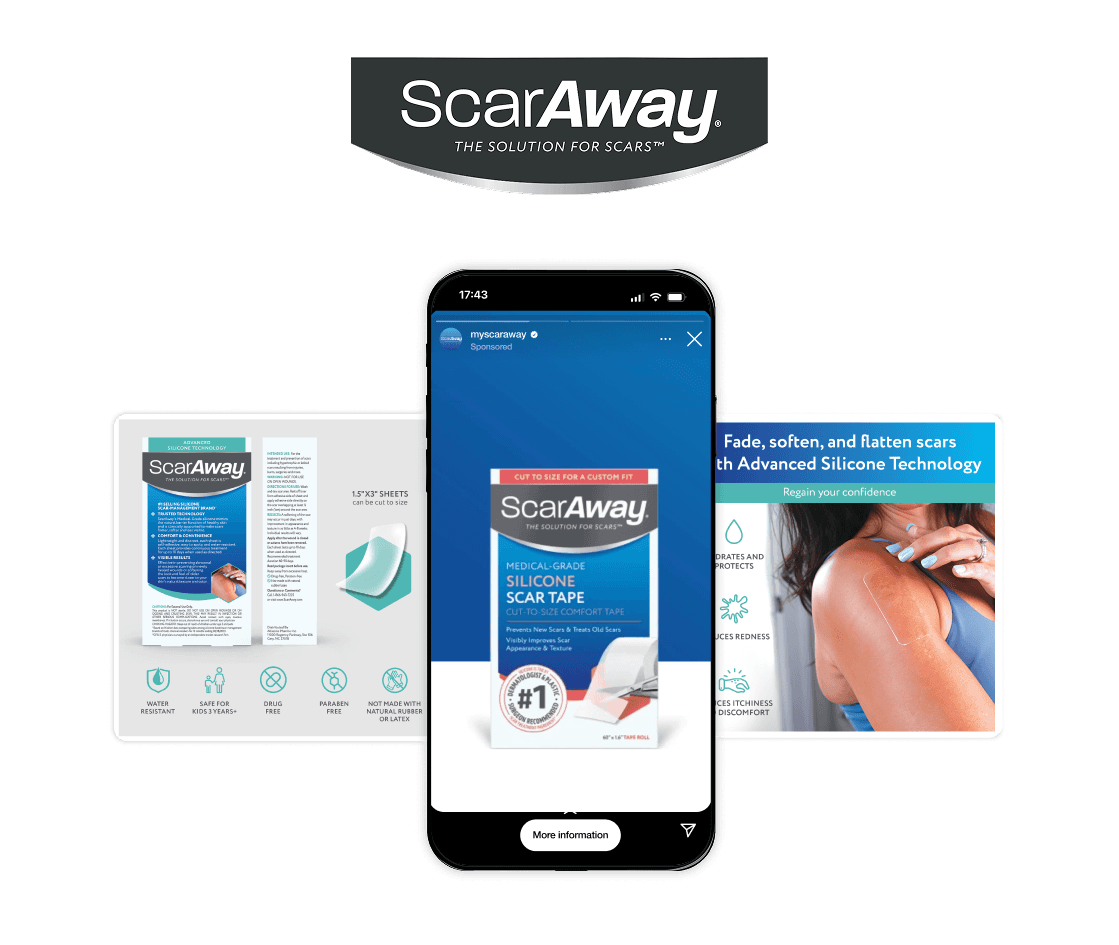
The relevance is not interactivity. It is what happens around the interactive unit after the campaign concept has already been approved.
A reliable creative versioning workflow can handle the repeatable sizes, products, offers, formats, and market versions, while the specialist interactive team stays focused on the experience that genuinely requires custom work.
Can your media plan actually support the format?
A strong interaction still needs enough compatible inventory to justify building it.
Publisher, DSP, ad-server, browser, and device rules can affect download size, expansion direction, autoplay, audio behavior, animation duration, interaction triggers, close controls, review time, and backup requirements.
Display & Video 360 currently limits the total files downloaded by a browser for a rich media creative to 5 MB, while noting that publishers can impose smaller limits. Animation can run for no longer than 30 seconds, autoplay audio is prohibited, and video can autoplay only when muted.
That means the media plan should reach Creative Ops before the interactive design is locked. The best expansion direction, video behavior, or interaction may be different once the actual publisher requirements are known.
Mobile app inventory adds another compatibility question
If the campaign includes rich media inside mobile apps, ask whether the creative needs to support MRAID, or Mobile Rich Media Ad Interface Definitions.
MRAID is the IAB Tech Lab’s common API for mobile rich media. It standardizes how an HTML5 and JavaScript creative communicates actions such as expanding, resizing, and accessing supported device capabilities across compatible apps and ad SDKs.
The buyer does not need to become an MRAID developer. They do need to know that in-app rich media introduces another technical requirement that should be confirmed with whoever is building and trafficking the unit.
Plan fallback creative according to the serving setup
Do not assume one universal backup rule.
Google’s current Studio documentation says a backup image is required when trafficking Studio HTML5 ads. By contrast, direct HTML5 uploads into Display & Video 360 currently treat the backup image as optional. If one is not supplied there, Google can serve a system-generated fallback when necessary.
That means the production brief should ask:
How will this creative be built, served, and trafficked?
If a useful static fallback is required or desirable, it should be designed alongside the rich media unit rather than recreated at the last minute. The fallback still needs to communicate the proposition without relying on expansion, gameplay, product rotation, or another interactive behavior.
For the wider conventional display set, static display banner production can handle the repeatable sizes and platform adaptations once the approved campaign system exists.
What will rich media add to your production workload?
Approving a rich media concept can create three distinct production streams: the specialist interactive execution itself, fallback or backup assets where the serving setup requires them, and the wider set of conventional display, video, social, retail, product, and market adaptations required by the media plan.
That distinction matters because the most visually impressive unit may represent only one part of the actual workload.
| Campaign layer | Typical production |
|---|---|
| Interactive hero execution | Specialist rich media build |
| Fallback coverage | Backup or standard creative where required |
| Standard display | Banner size set |
| Paid social | Platform-specific images and video |
| Retail media | Retailer-specific product creative |
| Products | SKU and offer variations |
| Markets | Language, legal, layout, and offer adaptations |
| Video | Aspect ratios, durations, and placement versions |
Count the supporting assets before you approve the concept
ScarAway is not a rich media case study, but it shows how quickly the surrounding asset count can grow once one consumer campaign has to work across several commerce and paid-media environments.
The relevance is not interactivity. It is what happens around the interactive unit after the campaign concept has already been approved.
A reliable creative versioning workflow can handle the repeatable sizes, products, offers, formats, and market versions, while the specialist interactive team stays focused on the experience that genuinely requires custom work.
Can your media plan actually support the format?
A strong interaction still needs enough compatible inventory to justify building it.
Publisher, DSP, ad-server, browser, and device rules can affect download size, expansion direction, autoplay, audio behavior, animation duration, interaction triggers, close controls, review time, and backup requirements.
Display & Video 360 currently limits the total files downloaded by a browser for a rich media creative to 5 MB, while noting that publishers can impose smaller limits. Animation can run for no longer than 30 seconds, autoplay audio is prohibited, and video can autoplay only when muted.
That means the media plan should reach Creative Ops before the interactive design is locked. The best expansion direction, video behavior, or interaction may be different once the actual publisher requirements are known.
Mobile app inventory adds another compatibility question
If the campaign includes rich media inside mobile apps, ask whether the creative needs to support MRAID, or Mobile Rich Media Ad Interface Definitions.
MRAID is the IAB Tech Lab’s common API for mobile rich media. It standardizes how an HTML5 and JavaScript creative communicates actions such as expanding, resizing, and accessing supported device capabilities across compatible apps and ad SDKs.
The buyer does not need to become an MRAID developer. They do need to know that in-app rich media introduces another technical requirement that should be confirmed with whoever is building and trafficking the unit.
Plan fallback creative according to the serving setup
Do not assume one universal backup rule.
Google’s current Studio documentation says a backup image is required when trafficking Studio HTML5 ads. By contrast, direct HTML5 uploads into Display & Video 360 currently treat the backup image as optional. If one is not supplied there, Google can serve a system-generated fallback when necessary.
That means the production brief should ask:
How will this creative be built, served, and trafficked?
If a useful static fallback is required or desirable, it should be designed alongside the rich media unit rather than recreated at the last minute. The fallback still needs to communicate the proposition without relying on expansion, gameplay, product rotation, or another interactive behavior.
For the wider conventional display set, static display banner production can handle the repeatable sizes and platform adaptations once the approved campaign system exists.
What should you measure for each rich media format?
Rich media creates more behavioral data because the customer can perform more actions inside the unit.
Google’s reporting supports rich media signals including interactions, exits, expansions, video behavior, display time, and interaction time. Custom event tracking can add further signals when the creative needs them.
The useful metric should correspond to the reason the format exists.
| Format | Interaction signal | Commercial outcome to keep beside it |
|---|---|---|
| Interactive motion / 3D | Interaction, rotation, expansion | PDP visits, conversion, CPA |
| Carousel / scroller | Cards or products explored | PDP visits, conversion, revenue |
| Expandable | Expansion rate, interaction time | Click-through, downstream conversion |
| Playable | Starts, completion | CPA, conversion, brand lift |
| Virtual try-on | Try-on starts, products or shades explored | Add-to-cart, PDP visits, sales |
| Personalized interactive | Experiences created, downloads | Product discovery, conversion |
| Interstitial | Interaction and click-through | CPA, ROAS, brand lift |
| Format | Interaction signal | Commercial outcome to keep beside it |
|---|---|---|
| Interactive motion / 3D | Interaction, rotation, expansion | PDP visits, conversion, CPA |
| Carousel / scroller | Cards or products explored | PDP visits, conversion, revenue |
| Expandable | Expansion rate, interaction time | Click-through, downstream conversion |
| Playable | Starts, completion | CPA, conversion, brand lift |
| Virtual try-on | Try-on starts, products or shades explored | Add-to-cart, PDP visits, sales |
| Personalized interactive | Experiences created, downloads | Product discovery, conversion |
| Interstitial | Interaction and click-through | CPA, ROAS, brand lift |
| Format | Interaction signal | Commercial outcome to keep beside it |
|---|---|---|
| Interactive motion / 3D | Interaction, rotation, expansion | PDP visits, conversion, CPA |
| Carousel / scroller | Cards or products explored | PDP visits, conversion, revenue |
| Expandable | Expansion rate, interaction time | Click-through, downstream conversion |
| Playable | Starts, completion | CPA, conversion, brand lift |
| Virtual try-on | Try-on starts, products or shades explored | Add-to-cart, PDP visits, sales |
| Personalized interactive | Experiences created, downloads | Product discovery, conversion |
| Interstitial | Interaction and click-through | CPA, ROAS, brand lift |
Interaction data helps explain whether people used the experience. It does not automatically prove that the experience created business value.
A playable could generate a strong completion rate without moving the commercial metric. A virtual try-on could have fewer users interact but still be valuable if those users become substantially more likely to visit a PDP or add the product to cart.
Set the customer action before creative starts
“Increase engagement” is too broad to guide an interactive build.
A more useful brief would say: Get shoppers to explore at least three products before they move to the PDP.
That gives the creative team a behavior to design around, Paid Marketing something meaningful to measure, and E-commerce a clearer idea of where the interaction should improve the buying journey.
Which parts need specialist rich media production and which can scale?
Some parts of the campaign genuinely require specialist production.
A bespoke playable, complex AR experience, coded expandable, 3D interaction, or deeply personalized unit may involve developers, interaction designers, 3D specialists, platform-specific tooling, or another rich media production partner.
The surrounding asset volume is a different kind of problem.
| Specialist interactive work | Repeatable campaign production |
|---|---|
| Custom playable | Static display sizes |
| Bespoke AR / try-on experience | Backup and fallback creative |
| Coded expandable | Video versions |
| 3D interaction | Paid-social adaptations |
| Complex interactive personalization | Retail media |
| Publisher-specific interaction logic | SKU and offer variants |
| Custom interactive functionality | Localization |
| Specialist interactive work | Repeatable campaign production |
|---|---|
| Custom playable | Static display sizes |
| Bespoke AR / try-on experience | Backup and fallback creative |
| Coded expandable | Video versions |
| 3D interaction | Paid-social adaptations |
| Complex interactive personalization | Retail media |
| Publisher-specific interaction logic | SKU and offer variants |
| Custom interactive functionality | Localization |
| Specialist interactive work | Repeatable campaign production |
|---|---|
| Custom playable | Static display sizes |
| Bespoke AR / try-on experience | Backup and fallback creative |
| Coded expandable | Video versions |
| 3D interaction | Paid-social adaptations |
| Complex interactive personalization | Retail media |
| Publisher-specific interaction logic | SKU and offer variants |
| Custom interactive functionality | Localization |
The specialist team should spend its time making the customer interaction work rather than rebuilding every standard banner and social asset attached to the same campaign.
Once the master idea is approved, creative versioning, video ad production, and retail media creative production can absorb the rule-based variations without suggesting that those workflows replace the bespoke rich media development itself.
This is also where evaluating creative automation tools becomes useful. The question is not whether automation can make another variation. It is which repetitive production tasks can be automated without reopening the creative or brand decision every time.
If the rich media concept is already approved, count every standard display size, fallback, video, retailer placement, SKU, offer, language, and market that still has to launch around it. If that supporting matrix is where the campaign begins to slow down, the production model is the part worth testing. |
Is rich media right for this campaign?
Before approving the additional build, answer five questions.
| Buyer question | What you are trying to establish |
|---|---|
| Does the interaction help the customer do something a standard ad cannot do as well? | Customer value |
| Is that behavior connected to the campaign objective? | Strategic relevance |
| Does enough of the planned inventory support the format? | Media feasibility |
| Can we measure the interaction and the downstream outcome? | Performance accountability |
| Can Creative Ops support the interactive unit and the campaign around it? | Production feasibility |
| Buyer question | What you are trying to establish |
|---|---|
| Does the interaction help the customer do something a standard ad cannot do as well? | Customer value |
| Is that behavior connected to the campaign objective? | Strategic relevance |
| Does enough of the planned inventory support the format? | Media feasibility |
| Can we measure the interaction and the downstream outcome? | Performance accountability |
| Can Creative Ops support the interactive unit and the campaign around it? | Production feasibility |
| Buyer question | What you are trying to establish |
|---|---|
| Does the interaction help the customer do something a standard ad cannot do as well? | Customer value |
| Is that behavior connected to the campaign objective? | Strategic relevance |
| Does enough of the planned inventory support the format? | Media feasibility |
| Can we measure the interaction and the downstream outcome? | Performance accountability |
| Can Creative Ops support the interactive unit and the campaign around it? | Production feasibility |
If all five answers are clear, the rich media execution has a stronger business case.
If the first question is difficult to answer, there is a good chance the campaign will be better served by strong static or video creative with less production overhead.
The interaction should make the customer’s next step easier
Rich media banner ad is not inherently more valuable because it contains more movement, technology, or code. It becomes valuable when the interaction helps someone make progress.
Lancôme lets customers inspect the product. McDonald’s gives a larger launch more room. KitKat turns its brand idea into participation. Dior reduces uncertainty by letting people try the product virtually. Indriya changes the experience around the shopper’s own choice.
The technology behind those campaigns is different, but the reason for using it is consistent. The interaction has a clear job in the customer journey.
That should be the standard before rich media banner ads enter the brief.
What should you measure for each rich media format?
Rich media creates more behavioral data because the customer can perform more actions inside the unit.
Google’s reporting supports rich media signals including interactions, exits, expansions, video behavior, display time, and interaction time. Custom event tracking can add further signals when the creative needs them.
The useful metric should correspond to the reason the format exists.
| Format | Interaction signal | Commercial outcome to keep beside it |
|---|---|---|
| Interactive motion / 3D | Interaction, rotation, expansion | PDP visits, conversion, CPA |
| Carousel / scroller | Cards or products explored | PDP visits, conversion, revenue |
| Expandable | Expansion rate, interaction time | Click-through, downstream conversion |
| Playable | Starts, completion | CPA, conversion, brand lift |
| Virtual try-on | Try-on starts, products or shades explored | Add-to-cart, PDP visits, sales |
| Personalized interactive | Experiences created, downloads | Product discovery, conversion |
| Interstitial | Interaction and click-through | CPA, ROAS, brand lift |
Interaction data helps explain whether people used the experience. It does not automatically prove that the experience created business value.
A playable could generate a strong completion rate without moving the commercial metric. A virtual try-on could have fewer users interact but still be valuable if those users become substantially more likely to visit a PDP or add the product to cart.
Set the customer action before creative starts
“Increase engagement” is too broad to guide an interactive build.
A more useful brief would say: Get shoppers to explore at least three products before they move to the PDP.
That gives the creative team a behavior to design around, Paid Marketing something meaningful to measure, and E-commerce a clearer idea of where the interaction should improve the buying journey.
Which parts need specialist rich media production and which can scale?
Some parts of the campaign genuinely require specialist production.
A bespoke playable, complex AR experience, coded expandable, 3D interaction, or deeply personalized unit may involve developers, interaction designers, 3D specialists, platform-specific tooling, or another rich media production partner.
The surrounding asset volume is a different kind of problem.
| Specialist interactive work | Repeatable campaign production |
|---|---|
| Custom playable | Static display sizes |
| Bespoke AR / try-on experience | Backup and fallback creative |
| Coded expandable | Video versions |
| 3D interaction | Paid-social adaptations |
| Complex interactive personalization | Retail media |
| Publisher-specific interaction logic | SKU and offer variants |
| Custom interactive functionality | Localization |
The specialist team should spend its time making the customer interaction work rather than rebuilding every standard banner and social asset attached to the same campaign.
Once the master idea is approved, creative versioning, video ad production, and retail media creative production can absorb the rule-based variations without suggesting that those workflows replace the bespoke rich media development itself.
This is also where evaluating creative automation tools becomes useful. The question is not whether automation can make another variation. It is which repetitive production tasks can be automated without reopening the creative or brand decision every time.
If the rich media concept is already approved, count every standard display size, fallback, video, retailer placement, SKU, offer, language, and market that still has to launch around it. If that supporting matrix is where the campaign begins to slow down, the production model is the part worth testing. |
Is rich media right for this campaign?
Before approving the additional build, answer five questions.
| Buyer question | What you are trying to establish |
|---|---|
| Does the interaction help the customer do something a standard ad cannot do as well? | Customer value |
| Is that behavior connected to the campaign objective? | Strategic relevance |
| Does enough of the planned inventory support the format? | Media feasibility |
| Can we measure the interaction and the downstream outcome? | Performance accountability |
| Can Creative Ops support the interactive unit and the campaign around it? | Production feasibility |
If all five answers are clear, the rich media execution has a stronger business case.
If the first question is difficult to answer, there is a good chance the campaign will be better served by strong static or video creative with less production overhead.
The interaction should make the customer’s next step easier
Rich media banner ad is not inherently more valuable because it contains more movement, technology, or code. It becomes valuable when the interaction helps someone make progress.
Lancôme lets customers inspect the product. McDonald’s gives a larger launch more room. KitKat turns its brand idea into participation. Dior reduces uncertainty by letting people try the product virtually. Indriya changes the experience around the shopper’s own choice.
The technology behind those campaigns is different, but the reason for using it is consistent. The interaction has a clear job in the customer journey.
That should be the standard before rich media banner ads enter the brief.
Frequently asked questions
What are rich media banner ads?
Rich media banner ads are interactive digital ads that can combine video, audio, expansion, games, galleries, 3D elements, personalization, or other interactive functionality. The IAB distinguishes rich media from simple animation based on whether users can interact with the advertising experience.
What are the main rich media ad formats?
Common formats include interactive motion and 3D ads, carousels and scrollers, expandable banners, playables, AR or virtual try-on experiences, personalized interactive creative, and interstitials.
What is the difference between an animated banner and a rich media ad?
Animation alone does not make an advertisement rich media. An animated banner can still behave like standard display creative if the viewer can only watch and click. Rich media adds user-controlled behaviors such as product exploration, expansion, gameplay, media interaction, personalization, or another interactive action.
What are some examples of rich media advertising?
Examples in this guide include Lancôme's 3D mascara experience, McDonald's branded carousel, KitKat's Candy Crush playable, Dior's AR lipstick try-on, and Indriya's personalized bridal experience. Each uses interaction for a different part of the customer journey rather than applying one generic rich media format to every campaign.
Do rich media ads need backup images?
It depends on how the creative is served. Google Studio documentation says a backup image is required for Studio HTML5 ads, while direct HTML5 uploads in Display & Video 360 currently make backup images optional. Confirm the serving and trafficking setup before finalizing the production scope.
What file size can a rich media ad be?
There is no universal file-size limit across all platforms and publishers. Display & Video 360 currently caps the total files downloaded by a browser for a rich media creative at 5 MB, while individual publishers may impose smaller limits.
Can rich media video autoplay with sound?
Not in current Display & Video 360 rich media creative. Autoplay audio is prohibited. Video can autoplay when muted, while user-initiated playback can support sound according to the relevant creative setup and publisher requirements.
What is MRAID?
MRAID stands for Mobile Rich Media Ad Interface Definitions. It is the IAB Tech Lab's standardized API for rich media creative running inside mobile apps, allowing compatible ads to communicate actions such as expansion and resizing across different app environments and SDKs.
How should performance marketers measure rich media?
Use the interaction metric that corresponds to the experience, such as expansion, product exploration, completion, or virtual try-on usage, while keeping the campaign's commercial KPI beside it. Interaction tells you how people used the rich media feature; conversion, CPA, revenue, ROAS, or brand lift tells you whether that behavior delivered useful business value.
When is rich media not worth the additional production?
Rich media is harder to justify when the interaction does not help the customer make a decision, compatible inventory is limited, the campaign depends on extremely rapid creative iteration, or the supporting asset workload outweighs the likely benefit of the interactive experience.
Frequently asked questions
What are rich media banner ads?
Rich media banner ads are interactive digital ads that can combine video, audio, expansion, games, galleries, 3D elements, personalization, or other interactive functionality. The IAB distinguishes rich media from simple animation based on whether users can interact with the advertising experience.
What are the main rich media ad formats?
Common formats include interactive motion and 3D ads, carousels and scrollers, expandable banners, playables, AR or virtual try-on experiences, personalized interactive creative, and interstitials.
What is the difference between an animated banner and a rich media ad?
Animation alone does not make an advertisement rich media. An animated banner can still behave like standard display creative if the viewer can only watch and click. Rich media adds user-controlled behaviors such as product exploration, expansion, gameplay, media interaction, personalization, or another interactive action.
What are some examples of rich media advertising?
Examples in this guide include Lancôme's 3D mascara experience, McDonald's branded carousel, KitKat's Candy Crush playable, Dior's AR lipstick try-on, and Indriya's personalized bridal experience. Each uses interaction for a different part of the customer journey rather than applying one generic rich media format to every campaign.
Do rich media ads need backup images?
It depends on how the creative is served. Google Studio documentation says a backup image is required for Studio HTML5 ads, while direct HTML5 uploads in Display & Video 360 currently make backup images optional. Confirm the serving and trafficking setup before finalizing the production scope.
What file size can a rich media ad be?
There is no universal file-size limit across all platforms and publishers. Display & Video 360 currently caps the total files downloaded by a browser for a rich media creative at 5 MB, while individual publishers may impose smaller limits.
Can rich media video autoplay with sound?
Not in current Display & Video 360 rich media creative. Autoplay audio is prohibited. Video can autoplay when muted, while user-initiated playback can support sound according to the relevant creative setup and publisher requirements.
What is MRAID?
MRAID stands for Mobile Rich Media Ad Interface Definitions. It is the IAB Tech Lab's standardized API for rich media creative running inside mobile apps, allowing compatible ads to communicate actions such as expansion and resizing across different app environments and SDKs.
How should performance marketers measure rich media?
Use the interaction metric that corresponds to the experience, such as expansion, product exploration, completion, or virtual try-on usage, while keeping the campaign's commercial KPI beside it. Interaction tells you how people used the rich media feature; conversion, CPA, revenue, ROAS, or brand lift tells you whether that behavior delivered useful business value.
When is rich media not worth the additional production?
Rich media is harder to justify when the interaction does not help the customer make a decision, compatible inventory is limited, the campaign depends on extremely rapid creative iteration, or the supporting asset workload outweighs the likely benefit of the interactive experience.
Recent Posts
Explore expert insights, creative strategies, and practical guides to help your brand create better content and scale faster.



See AI Studio in action for a real brief of your brand at zero cost and commitment.
See AI Studio in action for a real brief of your brand at zero cost and commitment.
See AI Studio in action for a real brief of your brand at zero cost and commitment.
See AI Studio in action for a real brief of your brand at zero cost and commitment.