
Updated On:
Amazon DSP creative specifications for every ad format
Amazon DSP creative specifications for every ad format
Amazon DSP creative specifications for every ad format
Written By

Anurag Dwivedi
" height="20px" id="fXPtLeYUp" width="20px"/></svg>)
Co-founder and CPO
Reviewed By

Satej Sirur
Co-founder and CEO

Key Takeaways
01
It uses technology to produce and adapt creative assets across formats, channels, and campaigns.
02
It uses technology to produce and adapt creative assets across formats, channels, and campaigns.
03
It uses technology to produce and adapt creative assets across formats, channels, and campaigns.
04
It uses technology to produce and adapt creative assets across formats, channels, and campaigns.
05
It uses technology to produce and adapt creative assets across formats, channels, and campaigns.
Key takeaways
|
|---|
Amazon DSP creative specs vary according to the inventory you are buying and the experience in which the ad will appear.
A desktop display campaign may require 300 × 250, 728 × 90, 160 × 600, and 300 × 600 banners with tightly controlled file weights.
An online video campaign needs video prepared for Amazon's digital video inventory, while Prime Video and Streaming TV require a television-quality 16:9 master.
Responsive eCommerce Creative works differently again because Amazon can assemble the final ad from product data, images, headlines, logos, pricing, ratings, and other shopping information. That means there is no single Amazon DSP asset specification that covers the entire campaign.
The more useful way to plan production is to start with the environments included in the media buy, understand what each environment expects from the creative, and then build the asset set around those requirements.
For most brands, the work usually falls into four groups: display creative, responsive commerce creative, online and streaming video, and Amazon-specific device or audio experiences.
Once those are separated, the technical specifications become much easier to manage.
Key takeaways
|
|---|
Amazon DSP creative specs vary according to the inventory you are buying and the experience in which the ad will appear.
A desktop display campaign may require 300 × 250, 728 × 90, 160 × 600, and 300 × 600 banners with tightly controlled file weights.
An online video campaign needs video prepared for Amazon's digital video inventory, while Prime Video and Streaming TV require a television-quality 16:9 master.
Responsive eCommerce Creative works differently again because Amazon can assemble the final ad from product data, images, headlines, logos, pricing, ratings, and other shopping information. That means there is no single Amazon DSP asset specification that covers the entire campaign.
The more useful way to plan production is to start with the environments included in the media buy, understand what each environment expects from the creative, and then build the asset set around those requirements.
For most brands, the work usually falls into four groups: display creative, responsive commerce creative, online and streaming video, and Amazon-specific device or audio experiences.
Once those are separated, the technical specifications become much easier to manage.
Quick Answer
What is creative automation?
It uses technology to produce and adapt creative assets across formats, channels, and campaigns.
Start with where the Amazon DSP campaign will actually run
Before Creative Ops receives a list of dimensions, Paid Marketing needs to establish which Amazon DSP environments are actually part of the buy.
Amazon DSP can reach people through Amazon-owned properties, third-party websites and apps, online video, Prime Video, Twitch, Fire TV, Alexa-enabled devices, Amazon Music, and other Streaming TV inventory.
Those placements may belong to one media plan, but they do not ask the creative to behave in the same way.
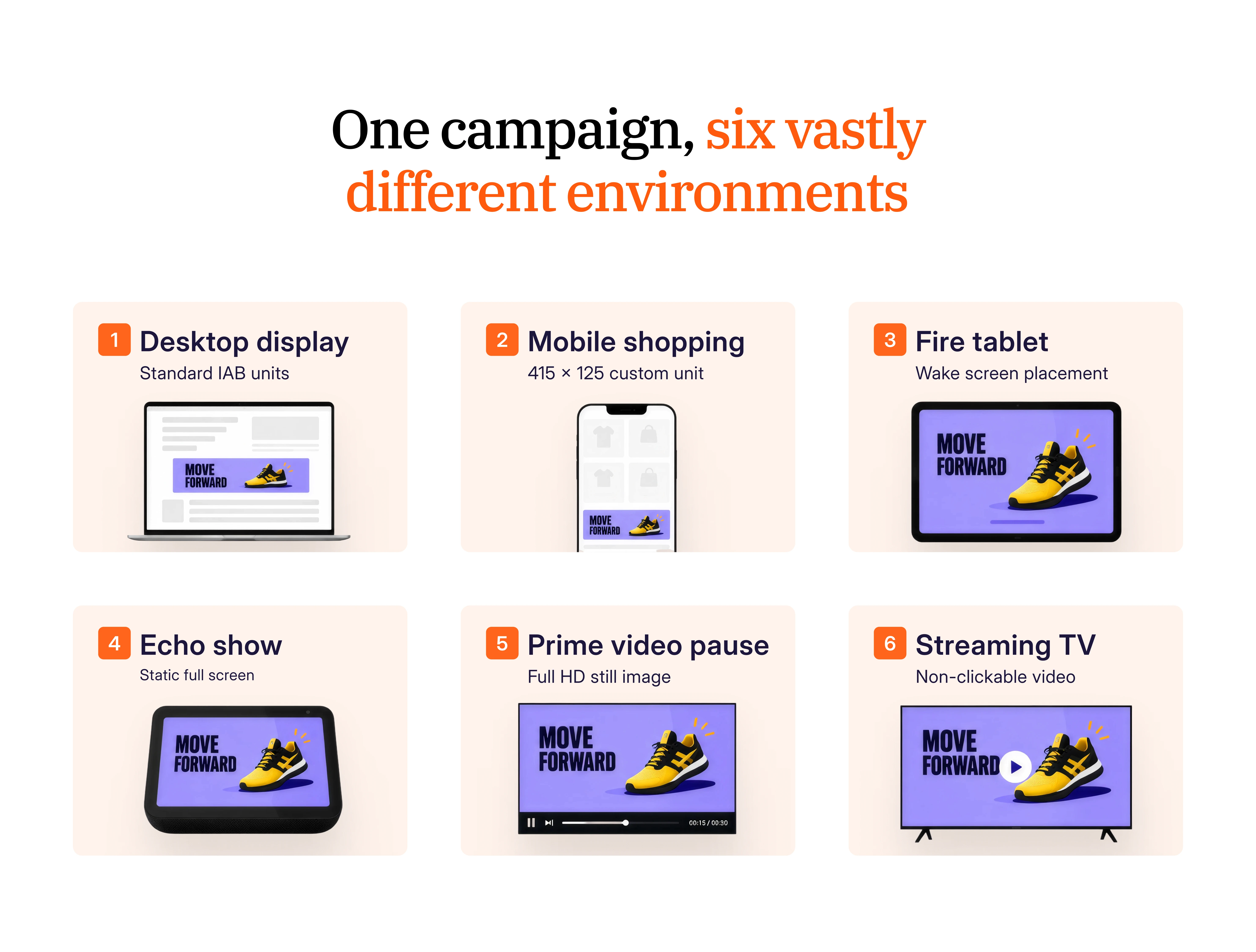
Environment | Typical creative | What changes for production |
Desktop and mobile display | Static or HTML display creative | Canvas size and file weight become the main constraints |
Responsive eCommerce Creative | Product and brand components | Catalog data becomes part of the ad |
Online video | Digital video | Clickable digital context and placement-specific ratios |
Streaming TV and Prime Video | Television-quality video | Large-screen viewing, exact duration, higher bitrate |
Prime Video Pause Ad | Static composition | Message has to work without motion |
Amazon Music and Alexa | Audio plus companion assets | The core message must work without a screen |
Alexa Home Screen | Image, logo, and copy components | Viewing distance changes how the creative is experienced |
Fire devices | Device-specific creative | Separate dimensions and interface behavior |
The production brief should therefore answer one question before anything is exported:
Which of these environments are we actually buying?
Producing every possible Amazon DSP format wastes time. Discovering an important placement after the campaign master has already been approved creates the opposite problem, because the team now has to reopen a finished concept to accommodate a requirement that should have been known earlier.
Start with where the Amazon DSP campaign will actually run
Before Creative Ops receives a list of dimensions, Paid Marketing needs to establish which Amazon DSP environments are actually part of the buy.
Amazon DSP can reach people through Amazon-owned properties, third-party websites and apps, online video, Prime Video, Twitch, Fire TV, Alexa-enabled devices, Amazon Music, and other Streaming TV inventory.
Those placements may belong to one media plan, but they do not ask the creative to behave in the same way.
Environment | Typical creative | What changes for production |
Desktop and mobile display | Static or HTML display creative | Canvas size and file weight become the main constraints |
Responsive eCommerce Creative | Product and brand components | Catalog data becomes part of the ad |
Online video | Digital video | Clickable digital context and placement-specific ratios |
Streaming TV and Prime Video | Television-quality video | Large-screen viewing, exact duration, higher bitrate |
Prime Video Pause Ad | Static composition | Message has to work without motion |
Amazon Music and Alexa | Audio plus companion assets | The core message must work without a screen |
Alexa Home Screen | Image, logo, and copy components | Viewing distance changes how the creative is experienced |
Fire devices | Device-specific creative | Separate dimensions and interface behavior |
The production brief should therefore answer one question before anything is exported:
Which of these environments are we actually buying?
Producing every possible Amazon DSP format wastes time. Discovering an important placement after the campaign master has already been approved creates the opposite problem, because the team now has to reopen a finished concept to accommodate a requirement that should have been known earlier.
Build display creative to the placement requirements
Many Amazon DSP display dimensions look familiar because they follow common IAB standards. The dimensions themselves are therefore unlikely to surprise an experienced creative team.
The file-weight requirements are where production needs more attention.
Desktop display
Placement | Display size | Static maximum | HTML maximum |
Medium rectangle | 300 × 250 | 40 KB* | 200 KB |
Leaderboard | 728 × 90 | 40 KB* | 200 KB |
Wide skyscraper | 160 × 600 | 40 KB* | 200 KB |
Large rectangle | 300 × 600 | 50 KB | 200 KB |
Billboard | 970 × 250 | 200 KB | 200 KB |
*Some regional specifications use 50 KB.
Amazon currently specifies JPG or PNG-8 for these site-served static units. Those file limits should influence the design before export rather than becoming a compression problem at the end.
A photographic 300 × 600 banner with gradients, texture, product detail, small copy, and a complex background may look strong in the design file but become visibly degraded once it has to fit inside 50 KB. Creative Ops therefore needs to understand the final delivery limit while the hierarchy and imagery are still being decided.
The 970 × 250 billboard also requires a larger source for some Amazon inventory. For North American onsite placements, Amazon specifies a 1940 × 500 source asset.
Mobile needs its own production treatment
Mobile placements add another requirement because several assets need to be supplied at twice the displayed dimensions.
Placement | Display size | Build size | Static maximum |
Mobile leaderboard | 320 × 50 | 640 × 100 | 50 KB |
Mobile medium rectangle | 300 × 250 | 600 × 500 | 40 KB |
Amazon mobile shopping | 414 × 125 | 828 × 250 | Varies by environment |
Tablet leaderboard | 728 × 90 | 1456 × 180 | 200 KB |
The 414 × 125 Amazon mobile shopping placement deserves particular attention because it is unusually wide and shallow. Creative designed for a 300 × 250 unit will not simply resize into it while preserving the same product scale, headline hierarchy, and CTA balance.
On mobile web, Amazon specifies an 828 × 250 source with a 640 × 250 safe area. DSP app inventory can have a different file-weight allowance, so the supply source should be included in the production brief rather than reduced to a generic "414 × 125" request.
When one approved concept needs to move across this many canvases, a structured creative versioning process helps preserve the idea while changing the layout for each destination.
Build display creative to the placement requirements
Many Amazon DSP display dimensions look familiar because they follow common IAB standards. The dimensions themselves are therefore unlikely to surprise an experienced creative team.
The file-weight requirements are where production needs more attention.
Desktop display
Placement | Display size | Static maximum | HTML maximum |
Medium rectangle | 300 × 250 | 40 KB* | 200 KB |
Leaderboard | 728 × 90 | 40 KB* | 200 KB |
Wide skyscraper | 160 × 600 | 40 KB* | 200 KB |
Large rectangle | 300 × 600 | 50 KB | 200 KB |
Billboard | 970 × 250 | 200 KB | 200 KB |
*Some regional specifications use 50 KB.
Amazon currently specifies JPG or PNG-8 for these site-served static units. Those file limits should influence the design before export rather than becoming a compression problem at the end.
A photographic 300 × 600 banner with gradients, texture, product detail, small copy, and a complex background may look strong in the design file but become visibly degraded once it has to fit inside 50 KB. Creative Ops therefore needs to understand the final delivery limit while the hierarchy and imagery are still being decided.
The 970 × 250 billboard also requires a larger source for some Amazon inventory. For North American onsite placements, Amazon specifies a 1940 × 500 source asset.
Mobile needs its own production treatment
Mobile placements add another requirement because several assets need to be supplied at twice the displayed dimensions.
Placement | Display size | Build size | Static maximum |
Mobile leaderboard | 320 × 50 | 640 × 100 | 50 KB |
Mobile medium rectangle | 300 × 250 | 600 × 500 | 40 KB |
Amazon mobile shopping | 414 × 125 | 828 × 250 | Varies by environment |
Tablet leaderboard | 728 × 90 | 1456 × 180 | 200 KB |
The 414 × 125 Amazon mobile shopping placement deserves particular attention because it is unusually wide and shallow. Creative designed for a 300 × 250 unit will not simply resize into it while preserving the same product scale, headline hierarchy, and CTA balance.
On mobile web, Amazon specifies an 828 × 250 source with a 640 × 250 safe area. DSP app inventory can have a different file-weight allowance, so the supply source should be included in the production brief rather than reduced to a generic "414 × 125" request.
When one approved concept needs to move across this many canvases, a structured creative versioning process helps preserve the idea while changing the layout for each destination.
Use Responsive eCommerce Creative when commerce belongs inside the ad
Static display is only one way to build Amazon DSP ads.
Responsive eCommerce Creative changes the production model because the designer is no longer creating every finished banner manually. Instead, the team supplies the product and brand components Amazon needs, and Amazon assembles the final experience responsively.
The current system can work with up to 20 ASINs and can incorporate product imagery, logos, uploaded lifestyle imagery, pricing, discounts, coupons, star ratings, Prime eligibility, headlines, and disclaimers. Amazon can then optimize layouts and product combinations across eligible placements.
Review Responsive eCommerce Creative requirements as it changes the relationship between merchandising and creative.
If the product image is weak, that weakness can now appear directly inside paid media. If a product title is awkward or pricing information is outdated, the problem is no longer confined to the detail page. The ad system can surface it as part of the campaign.
Give Amazon source material that can adapt cleanly
For responsive custom imagery, Amazon currently recommends supplying square, vertical, and wide assets:
Image | Recommended treatment |
Square | 1200 × 1200, 1:1 |
Vertical | 900 × 1600, 9:16 |
Wide | 1200 × 628, 1.91:1 |
The cropping workflow requires imagery of at least 600 × 600 and up to 5 MB. Amazon also advises against embedding logos, CTA buttons, pricing copy, or other text directly inside responsive imagery because those elements are handled elsewhere in the assembled unit. See current REC image guidelines
The image needs to stay useful when it is paired with different products, text treatments, and layout structures. A composition that depends on exact text placement may break once Amazon rearranges those components.
Sony shows how responsive commerce creative fits into a broader retail campaign
Sony used Responsive eCommerce ads alongside sponsored ads and Amazon DSP during its 11/11 and White Friday activity in the UAE.
Amazon reports 33% year-over-year revenue growth, an overall ROAS of 10, and an Amazon DSP ROAS of 40 for the campaign. Those figures describe Sony's specific campaign rather than a general benchmark.
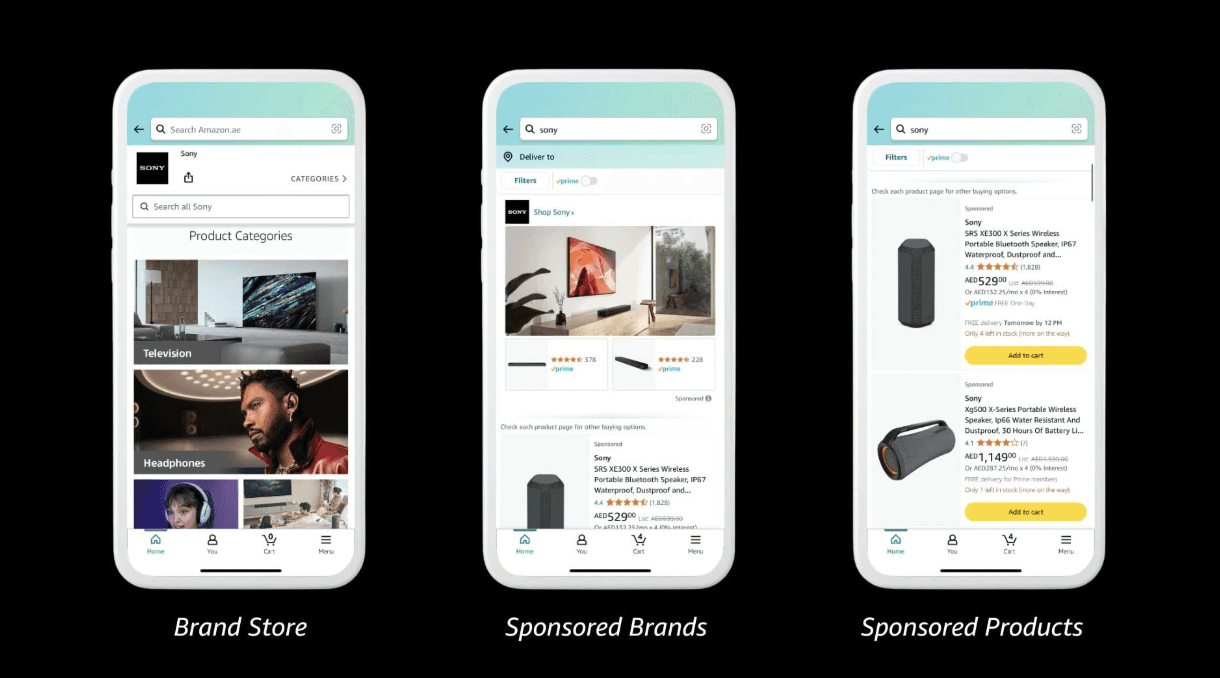
See Sony's Amazon Ads case study
The useful lesson for an e-commerce team is that the ad format sits inside a wider product and promotion system. The creative performs best when the underlying product imagery, offer, pricing, and catalog information are already clean enough to be reused dynamically.
For teams managing this same overlap across marketplaces, product feeds, and ads, retail media creative production increasingly becomes part of the same operating workflow.
Decide how much of the responsive creative Amazon should generate
Responsive eCommerce Creative can go beyond arranging the exact components an advertiser uploads. Amazon's AI-assisted creative capabilities can generate or select alternative images, backgrounds, text variations, layouts, and, in supported cases, video. For Paid Marketing teams, this can expand creative coverage without adding another manual production cycle.
The tradeoff is control. Some assets can tolerate more automated variation than others. A straightforward consumer-product image may adapt cleanly across backgrounds or layouts, while regulated claims, premium packaging, exact product proportions, campaign typography, and tightly art-directed compositions often need stricter guardrails.
Creative Ops should define those boundaries before the campaign scales. Product imagery, background treatments, copy, layout, and video do not all need the same level of control, so the team can decide which elements Amazon may adapt freely, which can change within approved rules, and which should remain fixed.
This is also where creative automation services need to be evaluated on more than output volume. The strongest setup removes repetitive production work while preserving the brand, compliance, and creative decisions that still benefit from human judgment.
Use Responsive eCommerce Creative when commerce belongs inside the ad
Static display is only one way to build Amazon DSP ads.
Responsive eCommerce Creative changes the production model because the designer is no longer creating every finished banner manually. Instead, the team supplies the product and brand components Amazon needs, and Amazon assembles the final experience responsively.
The current system can work with up to 20 ASINs and can incorporate product imagery, logos, uploaded lifestyle imagery, pricing, discounts, coupons, star ratings, Prime eligibility, headlines, and disclaimers. Amazon can then optimize layouts and product combinations across eligible placements.
Review Responsive eCommerce Creative requirements as it changes the relationship between merchandising and creative.
If the product image is weak, that weakness can now appear directly inside paid media. If a product title is awkward or pricing information is outdated, the problem is no longer confined to the detail page. The ad system can surface it as part of the campaign.
Give Amazon source material that can adapt cleanly
For responsive custom imagery, Amazon currently recommends supplying square, vertical, and wide assets:
Image | Recommended treatment |
Square | 1200 × 1200, 1:1 |
Vertical | 900 × 1600, 9:16 |
Wide | 1200 × 628, 1.91:1 |
The cropping workflow requires imagery of at least 600 × 600 and up to 5 MB. Amazon also advises against embedding logos, CTA buttons, pricing copy, or other text directly inside responsive imagery because those elements are handled elsewhere in the assembled unit. See current REC image guidelines
The image needs to stay useful when it is paired with different products, text treatments, and layout structures. A composition that depends on exact text placement may break once Amazon rearranges those components.
Sony shows how responsive commerce creative fits into a broader retail campaign
Sony used Responsive eCommerce ads alongside sponsored ads and Amazon DSP during its 11/11 and White Friday activity in the UAE.
Amazon reports 33% year-over-year revenue growth, an overall ROAS of 10, and an Amazon DSP ROAS of 40 for the campaign. Those figures describe Sony's specific campaign rather than a general benchmark.
See Sony's Amazon Ads case study
The useful lesson for an e-commerce team is that the ad format sits inside a wider product and promotion system. The creative performs best when the underlying product imagery, offer, pricing, and catalog information are already clean enough to be reused dynamically.
For teams managing this same overlap across marketplaces, product feeds, and ads, retail media creative production increasingly becomes part of the same operating workflow.
Decide how much of the responsive creative Amazon should generate
Responsive eCommerce Creative can go beyond arranging the exact components an advertiser uploads. Amazon's AI-assisted creative capabilities can generate or select alternative images, backgrounds, text variations, layouts, and, in supported cases, video. For Paid Marketing teams, this can expand creative coverage without adding another manual production cycle.
The tradeoff is control. Some assets can tolerate more automated variation than others. A straightforward consumer-product image may adapt cleanly across backgrounds or layouts, while regulated claims, premium packaging, exact product proportions, campaign typography, and tightly art-directed compositions often need stricter guardrails.
Creative Ops should define those boundaries before the campaign scales. Product imagery, background treatments, copy, layout, and video do not all need the same level of control, so the team can decide which elements Amazon may adapt freely, which can change within approved rules, and which should remain fixed.
This is also where creative automation services need to be evaluated on more than output volume. The strongest setup removes repetitive production work while preserving the brand, compliance, and creative decisions that still benefit from human judgment.
Treat online video and Streaming TV as separate deliverables
Online video and Streaming TV both use moving images, but they belong to different viewing environments and should not be treated as the same master with two exports.
Online video follows digital-video requirements
Amazon DSP online video can run in-stream and out-stream across Amazon-affiliated properties and eligible third-party inventory.
Current requirements include support for horizontal 16:9 and limited 9:16 inventory.
Requirement | Online video |
Horizontal ratio | 16:9 |
Supported vertical ratio | 9:16 |
Horizontal minimum | 1920 × 1080 for site-served creative |
Vertical minimum | 1080 × 1920 for site-served creative |
Maximum file size | 500 MB |
Duration | 6 to 120 seconds |
Recommended exact cuts | 6, 15, 20, 30, or 60 seconds |
Minimum site-served bitrate | 4 Mbps |
Recommended bitrate | 8 Mbps |
Amazon currently limits 9:16 online video inventory to supported environments such as Twitch and Amazon Publisher Direct, so Creative Ops should not automatically create an extensive vertical-video set unless Paid Marketing knows that inventory is actually included.
This is where the media plan should drive the aspect ratio rather than creative habit.
If the approved film needs six-second, 15-second, 30-second, and vertical versions, those are video ad variations of one campaign idea rather than four new concepts.
Streaming TV needs a television-quality master
Amazon Streaming TV ads run across Prime Video, Twitch, Fire TV Channels, and supported third-party television publishers.
The current technical requirements are substantially different from typical web-video delivery.
Requirement | Streaming TV |
Aspect ratio | 16:9 |
Minimum resolution | 1920 × 1080 |
Maximum file size | 500 MB |
Prime Video minimum bitrate | 15 Mbps |
Prime Video recommended bitrate | 50 Mbps |
Other supported supply minimum | 8 Mbps |
Audio bitrate | 192 kbps minimum |
Frame-rate mode | Constant |
Make sure to confirm the duration against the actual country and supply source before mastering begins.
Prime Video in the United States currently supports 15, 30, 45, and 60-second inventory. Prime Video in India supports additional lengths, including 10, 20, and 40 seconds. Third-party Streaming TV inventory can follow the publisher's own slot requirements.
That means "make a 30-second Streaming TV ad" is only a complete brief after the market and inventory have been confirmed.
Streaming TV also changes the CTA. Standard non-interactive inventory does not support a conventional click, so a button-shaped "Learn more" treatment suggests an action the viewer cannot actually take. Interactive video is a separate format and can support actions such as adding an item to cart or requesting information where available.
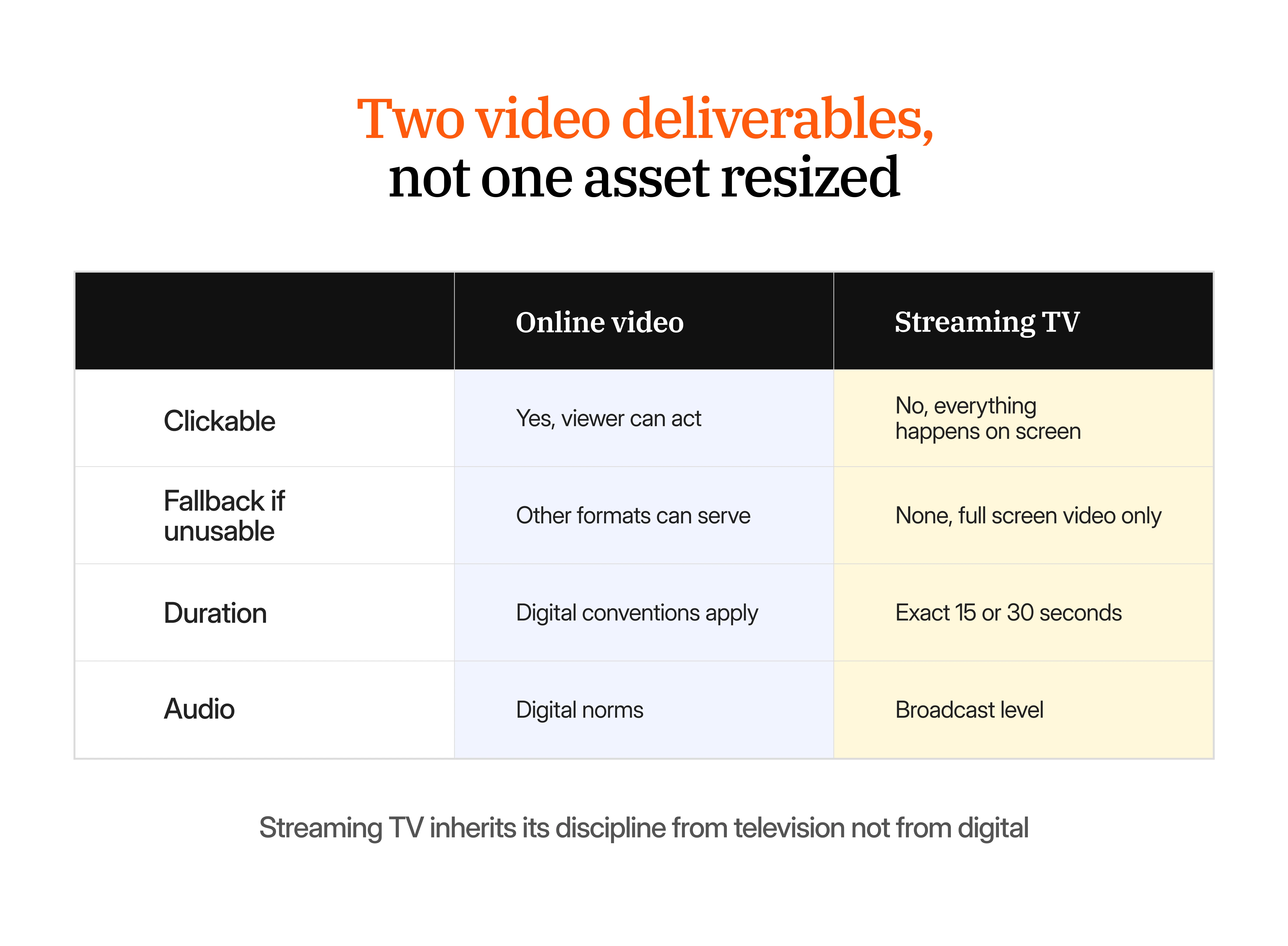
Coca-Cola shows what Amazon streaming creative looks like inside a larger campaign
Coca-Cola used Prime Video ads, Amazon DSP, sponsored advertising, and other Amazon experiences for its Star Wars campaign.
Amazon reports that the campaign reached 9.2 million unique viewers, increased new-to-brand customers by 26%, and drove 45% year-over-year sales growth.
The useful production lesson is that the Prime Video creative was one part of a coordinated campaign rather than a display asset stretched onto a television screen.
Treat online video and Streaming TV as separate deliverables
Online video and Streaming TV both use moving images, but they belong to different viewing environments and should not be treated as the same master with two exports.
Online video follows digital-video requirements
Amazon DSP online video can run in-stream and out-stream across Amazon-affiliated properties and eligible third-party inventory.
Current requirements include support for horizontal 16:9 and limited 9:16 inventory.
Requirement | Online video |
Horizontal ratio | 16:9 |
Supported vertical ratio | 9:16 |
Horizontal minimum | 1920 × 1080 for site-served creative |
Vertical minimum | 1080 × 1920 for site-served creative |
Maximum file size | 500 MB |
Duration | 6 to 120 seconds |
Recommended exact cuts | 6, 15, 20, 30, or 60 seconds |
Minimum site-served bitrate | 4 Mbps |
Recommended bitrate | 8 Mbps |
Amazon currently limits 9:16 online video inventory to supported environments such as Twitch and Amazon Publisher Direct, so Creative Ops should not automatically create an extensive vertical-video set unless Paid Marketing knows that inventory is actually included.
This is where the media plan should drive the aspect ratio rather than creative habit.
If the approved film needs six-second, 15-second, 30-second, and vertical versions, those are video ad variations of one campaign idea rather than four new concepts.
Streaming TV needs a television-quality master
Amazon Streaming TV ads run across Prime Video, Twitch, Fire TV Channels, and supported third-party television publishers.
The current technical requirements are substantially different from typical web-video delivery.
Requirement | Streaming TV |
Aspect ratio | 16:9 |
Minimum resolution | 1920 × 1080 |
Maximum file size | 500 MB |
Prime Video minimum bitrate | 15 Mbps |
Prime Video recommended bitrate | 50 Mbps |
Other supported supply minimum | 8 Mbps |
Audio bitrate | 192 kbps minimum |
Frame-rate mode | Constant |
Make sure to confirm the duration against the actual country and supply source before mastering begins.
Prime Video in the United States currently supports 15, 30, 45, and 60-second inventory. Prime Video in India supports additional lengths, including 10, 20, and 40 seconds. Third-party Streaming TV inventory can follow the publisher's own slot requirements.
That means "make a 30-second Streaming TV ad" is only a complete brief after the market and inventory have been confirmed.
Streaming TV also changes the CTA. Standard non-interactive inventory does not support a conventional click, so a button-shaped "Learn more" treatment suggests an action the viewer cannot actually take. Interactive video is a separate format and can support actions such as adding an item to cart or requesting information where available.
Coca-Cola shows what Amazon streaming creative looks like inside a larger campaign
Coca-Cola used Prime Video ads, Amazon DSP, sponsored advertising, and other Amazon experiences for its Star Wars campaign.
Amazon reports that the campaign reached 9.2 million unique viewers, increased new-to-brand customers by 26%, and drove 45% year-over-year sales growth.
The useful production lesson is that the Prime Video creative was one part of a coordinated campaign rather than a display asset stretched onto a television screen.
Treat Prime Video Pause Ads as their own static composition
A Prime Video Pause Ad appears when the viewer pauses the content and remains visible until playback resumes.
Because there is no motion carrying the message, the layout has to work immediately as a still.
Amazon builds the experience from several components, including the background image, logo, creative copy, optional legal text, optional QR code, and dynamically generated product or CTA information.
Amazon requires at least a 1920 × 1080 background and recommends a 3840 × 2160 source for better image quality. The layout also reserves part of the screen for Amazon's copy and commerce elements, so the background image needs to be composed around that structure rather than treated as a screenshot from the TV ad.
For shoppable Pause Ads, the product shown in the image should also match the product the customer will actually add to cart, including visible attributes such as size or color.
This makes the Pause Ad another good example of why a common campaign idea can still require a genuinely different composition.
Add audio and Alexa only when they are part of the buy
Amazon DSP also reaches environments where the screen is secondary or absent altogether. These formats should not automatically inflate the creative scope. They should be added when the media plan actually includes them.
Audio needs a message that works without visuals
Amazon audio ads currently run between 10 and 30 seconds and can appear across Amazon Music, connected devices, mobile, desktop, and smart-speaker environments.
Final files support WAV, MP3, or OGG, with a maximum size of 3 MB. Amazon also requires a 1024 × 1024 companion image, with an optional 300 × 250 companion asset. See Amazon audio ad specifications
Interactive audio can go further by letting Alexa users perform actions such as adding a product to cart, setting a reminder, or asking Amazon to send more information. That means the spoken CTA can become part of the interaction itself rather than simply an ending line in a radio-style script.
Sony used interactive audio for its "For the Music" campaign. Amazon reports more than 16 million impressions, 5,800 add-to-cart actions, and a cost per add-to-cart 77% lower than Sony's Amazon average for the campaign. See Sony's interactive audio case study
Alexa Home Screen has a different viewing distance
Alexa Home Screen ads on Echo Show use component-based creative rather than a normal display banner.
Current inputs include a 1920 × 1080 campaign image, an optional 1080 × 1080 image, a logo of at least 400 × 400, a headline up to 50 characters, and a brand name up to 25 characters. The rendered experience can change depending on the viewer's distance from the device.
Treat Prime Video Pause Ads as their own static composition
A Prime Video Pause Ad appears when the viewer pauses the content and remains visible until playback resumes.
Because there is no motion carrying the message, the layout has to work immediately as a still.
Amazon builds the experience from several components, including the background image, logo, creative copy, optional legal text, optional QR code, and dynamically generated product or CTA information.
Amazon requires at least a 1920 × 1080 background and recommends a 3840 × 2160 source for better image quality. The layout also reserves part of the screen for Amazon's copy and commerce elements, so the background image needs to be composed around that structure rather than treated as a screenshot from the TV ad.
For shoppable Pause Ads, the product shown in the image should also match the product the customer will actually add to cart, including visible attributes such as size or color.
This makes the Pause Ad another good example of why a common campaign idea can still require a genuinely different composition.
Add audio and Alexa only when they are part of the buy
Amazon DSP also reaches environments where the screen is secondary or absent altogether. These formats should not automatically inflate the creative scope. They should be added when the media plan actually includes them.
Audio needs a message that works without visuals
Amazon audio ads currently run between 10 and 30 seconds and can appear across Amazon Music, connected devices, mobile, desktop, and smart-speaker environments.
Final files support WAV, MP3, or OGG, with a maximum size of 3 MB. Amazon also requires a 1024 × 1024 companion image, with an optional 300 × 250 companion asset. See Amazon audio ad specifications
Interactive audio can go further by letting Alexa users perform actions such as adding a product to cart, setting a reminder, or asking Amazon to send more information. That means the spoken CTA can become part of the interaction itself rather than simply an ending line in a radio-style script.
Sony used interactive audio for its "For the Music" campaign. Amazon reports more than 16 million impressions, 5,800 add-to-cart actions, and a cost per add-to-cart 77% lower than Sony's Amazon average for the campaign. See Sony's interactive audio case study
Alexa Home Screen has a different viewing distance
Alexa Home Screen ads on Echo Show use component-based creative rather than a normal display banner.
Current inputs include a 1920 × 1080 campaign image, an optional 1080 × 1080 image, a logo of at least 400 × 400, a headline up to 50 characters, and a brand name up to 25 characters. The rendered experience can change depending on the viewer's distance from the device.
Turn the media plan into an asset matrix before production starts
By this point, "we need Amazon DSP assets" should sound too vague to send to Creative Ops.
A useful brief maps every media line to the creative it actually requires.
Media buy | Production requirement |
Desktop display | Relevant desktop banner sizes |
Mobile display | Mobile and Amazon-specific 2× assets |
Responsive eCommerce | Product imagery, logos, copy, ASINs, and responsive source ratios |
Online video | Relevant 16:9 and supported 9:16 cuts |
Streaming TV | Country and inventory-specific 1920 × 1080 master |
Prime Video Pause | Dedicated static background and copy components |
Audio | 10 to 30-second audio plus companion artwork |
Alexa | Environment-specific image, logo, and copy |
Multiple markets | Localized product, copy, and compliance variations |
This gives Paid Marketing and Creative Ops the same definition of the campaign before work reaches the production queue.
QA the catalog alongside the creative files
Responsive eCommerce Creative makes Amazon DSP particularly relevant to e-commerce teams because some of the most important creative inputs no longer live in the design file.
Amazon can surface product imagery, pricing, deal badges, coupons, Prime eligibility, ratings, and product titles directly inside the advertising experience.
Before launch, check the product imagery, title, live price, promotion, availability, rating context, ASIN, destination, and product variation that may appear in the ad.
A well-designed responsive layout cannot compensate for outdated product information.
When teams are already managing Amazon, retailer-media creative, PDP imagery, and other product-led channels, this is another reason to connect product and retail creative production rather than treating merchandising and paid-media output as separate workflows.
Build Amazon's acceptance requirements into production QA
The final technical review should happen before trafficking, not after Amazon rejects the file. The checklist changes by format, but several questions belong in the production workflow:
For display, is each file under the correct 40, 50, 100, or 200 KB limit for the exact placement?
For mobile, was the source produced at the correct 2× dimensions?
For Responsive eCommerce, are the product image, price, title, promotion, and inventory current?
For online video, does the aspect ratio match inventory Paid Marketing is actually buying?
For Streaming TV, is the duration supported in that country and supply source, and are bitrate, resolution, audio, and frame rate correct?
For non-interactive TV, does the creative avoid buttons or other elements that imply the viewer can click?
For Pause Ads, does the visual product match the product the customer will receive?
For audio, does the message work without a screen, and is the companion creative included?
Once these checks repeat across many products, formats, and markets, brand and platform compliance workflows can reduce the amount of manual inspection required for each export.
Turn the media plan into an asset matrix before production starts
By this point, "we need Amazon DSP assets" should sound too vague to send to Creative Ops.
A useful brief maps every media line to the creative it actually requires.
Media buy | Production requirement |
Desktop display | Relevant desktop banner sizes |
Mobile display | Mobile and Amazon-specific 2× assets |
Responsive eCommerce | Product imagery, logos, copy, ASINs, and responsive source ratios |
Online video | Relevant 16:9 and supported 9:16 cuts |
Streaming TV | Country and inventory-specific 1920 × 1080 master |
Prime Video Pause | Dedicated static background and copy components |
Audio | 10 to 30-second audio plus companion artwork |
Alexa | Environment-specific image, logo, and copy |
Multiple markets | Localized product, copy, and compliance variations |
This gives Paid Marketing and Creative Ops the same definition of the campaign before work reaches the production queue.
QA the catalog alongside the creative files
Responsive eCommerce Creative makes Amazon DSP particularly relevant to e-commerce teams because some of the most important creative inputs no longer live in the design file.
Amazon can surface product imagery, pricing, deal badges, coupons, Prime eligibility, ratings, and product titles directly inside the advertising experience.
Before launch, check the product imagery, title, live price, promotion, availability, rating context, ASIN, destination, and product variation that may appear in the ad.
A well-designed responsive layout cannot compensate for outdated product information.
When teams are already managing Amazon, retailer-media creative, PDP imagery, and other product-led channels, this is another reason to connect product and retail creative production rather than treating merchandising and paid-media output as separate workflows.
Build Amazon's acceptance requirements into production QA
The final technical review should happen before trafficking, not after Amazon rejects the file. The checklist changes by format, but several questions belong in the production workflow:
For display, is each file under the correct 40, 50, 100, or 200 KB limit for the exact placement?
For mobile, was the source produced at the correct 2× dimensions?
For Responsive eCommerce, are the product image, price, title, promotion, and inventory current?
For online video, does the aspect ratio match inventory Paid Marketing is actually buying?
For Streaming TV, is the duration supported in that country and supply source, and are bitrate, resolution, audio, and frame rate correct?
For non-interactive TV, does the creative avoid buttons or other elements that imply the viewer can click?
For Pause Ads, does the visual product match the product the customer will receive?
For audio, does the message work without a screen, and is the companion creative included?
Once these checks repeat across many products, formats, and markets, brand and platform compliance workflows can reduce the amount of manual inspection required for each export.
Separate the campaign idea from the Amazon DSP outputs
A complete Amazon DSP build becomes large very quickly.
One consumer campaign may need five desktop display dimensions, several mobile units, three responsive imagery ratios, multiple ASINs, several online-video cuts, one Streaming TV master, one Pause Ad, and localized versions for several markets. The team has not created dozens of new ideas.
Most of that workload exists because a smaller number of approved ideas have to be adapted into many destinations. That is the distinction Creative Ops needs to preserve.
Strategy and creative direction should still own the concept, campaign hierarchy, product emphasis, visual system, messaging, and video story.
Production can then own repeatable work such as dimensions, crops, product swaps, compression, alternate durations, language versions, naming, file preparation, and platform checks.
Once the same approved creative starts multiplying across this many outputs, creative automation becomes useful when it removes repetitive production without lowering the quality bar.
You can see how that model behaves at larger volumes across these consumer-brand case studies.
If Amazon DSP campaigns regularly leave Creative Ops with a long tail of banner sizes, product swaps, video cuts, and platform corrections after the campaign idea has already been approved, test that production layer separately. Take one DSP campaign you have already delivered and compare turnaround, internal production time, review cycles, output accuracy, and final quality. |
|---|
Build the asset list from the media buy
The most useful Amazon DSP creative specs are not simply a list of dimensions. They explain what experience each asset is being built for.
A 300 × 250 banner is a compact display problem, while Responsive eCommerce Creative combines advertising with live commerce information. Online video belongs to a digital viewing environment, but Prime Video requires television-quality mastering. A Pause Ad has to communicate without motion, while an audio ad has to communicate without depending on a screen.
Once Paid Marketing establishes which of those experiences belong in the campaign, Creative Ops can build a complete asset matrix instead of producing Amazon formats speculatively. This is the planning decision that makes the rest of the Amazon DSP specifications much easier to execute.
Separate the campaign idea from the Amazon DSP outputs
A complete Amazon DSP build becomes large very quickly.
One consumer campaign may need five desktop display dimensions, several mobile units, three responsive imagery ratios, multiple ASINs, several online-video cuts, one Streaming TV master, one Pause Ad, and localized versions for several markets. The team has not created dozens of new ideas.
Most of that workload exists because a smaller number of approved ideas have to be adapted into many destinations. That is the distinction Creative Ops needs to preserve.
Strategy and creative direction should still own the concept, campaign hierarchy, product emphasis, visual system, messaging, and video story.
Production can then own repeatable work such as dimensions, crops, product swaps, compression, alternate durations, language versions, naming, file preparation, and platform checks.
Once the same approved creative starts multiplying across this many outputs, creative automation becomes useful when it removes repetitive production without lowering the quality bar.
You can see how that model behaves at larger volumes across these consumer-brand case studies.
If Amazon DSP campaigns regularly leave Creative Ops with a long tail of banner sizes, product swaps, video cuts, and platform corrections after the campaign idea has already been approved, test that production layer separately. Take one DSP campaign you have already delivered and compare turnaround, internal production time, review cycles, output accuracy, and final quality. |
|---|
Build the asset list from the media buy
The most useful Amazon DSP creative specs are not simply a list of dimensions. They explain what experience each asset is being built for.
A 300 × 250 banner is a compact display problem, while Responsive eCommerce Creative combines advertising with live commerce information. Online video belongs to a digital viewing environment, but Prime Video requires television-quality mastering. A Pause Ad has to communicate without motion, while an audio ad has to communicate without depending on a screen.
Once Paid Marketing establishes which of those experiences belong in the campaign, Creative Ops can build a complete asset matrix instead of producing Amazon formats speculatively. This is the planning decision that makes the rest of the Amazon DSP specifications much easier to execute.
Frequently asked questions
What are the Amazon DSP creative specs?
Amazon DSP creative specs depend on the inventory being purchased. Standard desktop display includes sizes such as 300 × 250, 728 × 90, 160 × 600, 300 × 600, and 970 × 250. Mobile adds Amazon-specific and 2× assets, while online video and Streaming TV have separate video requirements.
What are the Amazon DSP display ad sizes?
Common desktop sizes include 300 × 250, 728 × 90, 160 × 600, 300 × 600, and 970 × 250. Mobile placements include 320 × 50, 300 × 250, and Amazon's custom 414 × 125 mobile shopping placement.
What is the maximum file size for Amazon DSP display ads?
There is no single maximum. Current static desktop limits include approximately 40 KB for 300 × 250, 728 × 90, and 160 × 600, 50 KB for 300 × 600, and 200 KB for 970 × 250, with some regional and placement-specific differences.
What is the Amazon DSP 414 × 125 creative size?
The 414 × 125 format is an Amazon-specific mobile shopping placement. Amazon requires an 828 × 250 2× source. File-weight and safe-area requirements depend on whether the creative runs on mobile web or app inventory.
What is Responsive eCommerce Creative?
Responsive eCommerce Creative is an Amazon DSP format that creates responsive ads using product and brand components. It can combine product imagery, pricing, promotions, star ratings, Prime eligibility, logos, and headlines and currently supports up to 20 ASINs in a creative.
What image sizes should I provide for Responsive eCommerce Creative?
Amazon recommends 1200 × 1200 square, 900 × 1600 vertical, and 1200 × 628 wide images for responsive custom imagery. The image-cropping workflow requires high-quality files of at least 600 × 600 and up to 5 MB.
What are the Amazon DSP online video specs?
Amazon DSP online video supports 16:9 and supported 9:16 inventory. Site-served horizontal video requires at least 1920 × 1080, while supported vertical video requires 1080 × 1920. Video can run from 6 to 120 seconds, with exact cuts such as 6, 15, 20, 30, and 60 seconds recommended.
What are the Amazon DSP Streaming TV specs?
Streaming TV uses 16:9 at a minimum 1920 × 1080, with files up to 500 MB. Prime Video requires at least 15 Mbps and recommends 50 Mbps. Accepted durations vary by country and inventory source, so the media plan should be confirmed before the final master is produced.
Are Amazon Streaming TV ads clickable?
Standard non-interactive Streaming TV ads are not clickable, so the creative should not use buttons or other elements that imply a viewer can click. Interactive formats are separate and can support actions such as adding products to cart where available.
What are the Prime Video Pause Ad specs?
Amazon requires at least a 1920 × 1080 background image and recommends a 3840 × 2160 source. The ad also uses separate logo and copy components, with Amazon dynamically adding relevant product or CTA elements.
What are the Amazon audio ad specs?
Amazon audio ads run for 10 to 30 seconds and support WAV, MP3, or OGG. The maximum audio file size is 3 MB, and a 1024 × 1024 companion image is required.
Can Amazon DSP drive traffic outside Amazon?
Yes. Amazon DSP can reach audiences across Amazon properties and third-party inventory, and supported campaigns can drive users to destinations outside Amazon when the destination and advertising setup meet Amazon's requirements.
Frequently asked questions
What are the Amazon DSP creative specs?
Amazon DSP creative specs depend on the inventory being purchased. Standard desktop display includes sizes such as 300 × 250, 728 × 90, 160 × 600, 300 × 600, and 970 × 250. Mobile adds Amazon-specific and 2× assets, while online video and Streaming TV have separate video requirements.
What are the Amazon DSP display ad sizes?
Common desktop sizes include 300 × 250, 728 × 90, 160 × 600, 300 × 600, and 970 × 250. Mobile placements include 320 × 50, 300 × 250, and Amazon's custom 414 × 125 mobile shopping placement.
What is the maximum file size for Amazon DSP display ads?
There is no single maximum. Current static desktop limits include approximately 40 KB for 300 × 250, 728 × 90, and 160 × 600, 50 KB for 300 × 600, and 200 KB for 970 × 250, with some regional and placement-specific differences.
What is the Amazon DSP 414 × 125 creative size?
The 414 × 125 format is an Amazon-specific mobile shopping placement. Amazon requires an 828 × 250 2× source. File-weight and safe-area requirements depend on whether the creative runs on mobile web or app inventory.
What is Responsive eCommerce Creative?
Responsive eCommerce Creative is an Amazon DSP format that creates responsive ads using product and brand components. It can combine product imagery, pricing, promotions, star ratings, Prime eligibility, logos, and headlines and currently supports up to 20 ASINs in a creative.
What image sizes should I provide for Responsive eCommerce Creative?
Amazon recommends 1200 × 1200 square, 900 × 1600 vertical, and 1200 × 628 wide images for responsive custom imagery. The image-cropping workflow requires high-quality files of at least 600 × 600 and up to 5 MB.
What are the Amazon DSP online video specs?
Amazon DSP online video supports 16:9 and supported 9:16 inventory. Site-served horizontal video requires at least 1920 × 1080, while supported vertical video requires 1080 × 1920. Video can run from 6 to 120 seconds, with exact cuts such as 6, 15, 20, 30, and 60 seconds recommended.
What are the Amazon DSP Streaming TV specs?
Streaming TV uses 16:9 at a minimum 1920 × 1080, with files up to 500 MB. Prime Video requires at least 15 Mbps and recommends 50 Mbps. Accepted durations vary by country and inventory source, so the media plan should be confirmed before the final master is produced.
Are Amazon Streaming TV ads clickable?
Standard non-interactive Streaming TV ads are not clickable, so the creative should not use buttons or other elements that imply a viewer can click. Interactive formats are separate and can support actions such as adding products to cart where available.
What are the Prime Video Pause Ad specs?
Amazon requires at least a 1920 × 1080 background image and recommends a 3840 × 2160 source. The ad also uses separate logo and copy components, with Amazon dynamically adding relevant product or CTA elements.
What are the Amazon audio ad specs?
Amazon audio ads run for 10 to 30 seconds and support WAV, MP3, or OGG. The maximum audio file size is 3 MB, and a 1024 × 1024 companion image is required.
Can Amazon DSP drive traffic outside Amazon?
Yes. Amazon DSP can reach audiences across Amazon properties and third-party inventory, and supported campaigns can drive users to destinations outside Amazon when the destination and advertising setup meet Amazon's requirements.
Recent Posts
Explore expert insights, creative strategies, and practical guides to help your brand create better content and scale faster.


Give AI Studio one campaign brief and compare the turnaround, size coverage, and platform rejection rate against your last DSP build.
LET'S BUILD WHAT COMES NEXT
Talk to an Expert


Give AI Studio one campaign brief and compare the turnaround, size coverage, and platform rejection rate against your last DSP build.
Give AI Studio one campaign brief and compare the turnaround, size coverage, and platform rejection rate against your last DSP build.