
How to plan Prime Day marketing for a multi-brand, multi-retailer portfolio
Playbook
Claron Kinny
|
Growth & Content
Satej Sirur, Co-founder & CEO

2. Pick priority products and write every offer as data
Owner: Ecommerce and paid media
Before creative starts, agree brand by brand on which products carry the event and which offer each one gets: a Lightning Deal, Best Deal, coupon, or Prime Exclusive Discount. Then record each offer as structured fields instead of copy baked into a layout.
Product: ASIN, brand, and hero image reference
Offer type: The Amazon deal type or coupon
Offer value: Discount, price, or badge text
Dates: Start and end times for the offer
Status: Submitted, approved, or at risk
That sheet becomes the input for every variant downstream. When an offer changes, you update one row instead of opening forty design files. Paid and ecommerce also get a single answer to the question legal will ask later: what exactly is this creative allowed to promise?
The product imagery feeding those rows deserves the same attention. Shoppers who click a deal ad land on the product page, and the principles behind high-converting Amazon PDP assets apply to event creative as much as to everyday listings.
How Purina backed different products on different retailers
During Prime Big Deal Days 2025, Mars United's CPG recap found Nestlé Purina leading the pet category on both Amazon and Walmart, with different products doing the work: Pro Plan on Amazon, and Dog Chow and Cat Chow on Walmart. One portfolio, one week, two different sets of priority products.
Choose priority products per retailer as well as per brand, since shoppers on each retailer reach for different items.
Record that choice as its own column in the offer sheet. Creative operations then knows which product needs which retailer's hero asset before the build starts.
3. Count your assets before anyone opens a design file
Owner: Paid media and creative operations
Ask a media team how many creatives Prime Day needs, and you'll usually hear a number between six and twenty. That's the number of concepts. The asset count comes from multiplying five things together.
Priority products: Dozens for a portfolio brand, not the three hero products in the deck
Placement types: Sponsored Brands, Sponsored Brands video, Sponsored Display, DSP display, DSP video, Brand Store modules, and A+ content
Sizes per placement: Each with its own dimensions and file-weight limit
Markets: Usually the US, UK, and Canada for a portfolio like this
Offer variants: Deal, coupon, and evergreen messaging aren't interchangeable
Run the numbers for a beauty portfolio promoting 12 hero products across 6 placement types, averaging 3 sizes each, in 3 markets. That's 648 assets before a single offer variant or a retailer outside Amazon. Very few of them need a new idea. They need resizing, copy swaps, product swaps, and exports.
The full list of DSP sizes and formats is in our Amazon DSP creative specs guide. Pull it into the plan now. Week three is a bad time to read it for the first time.
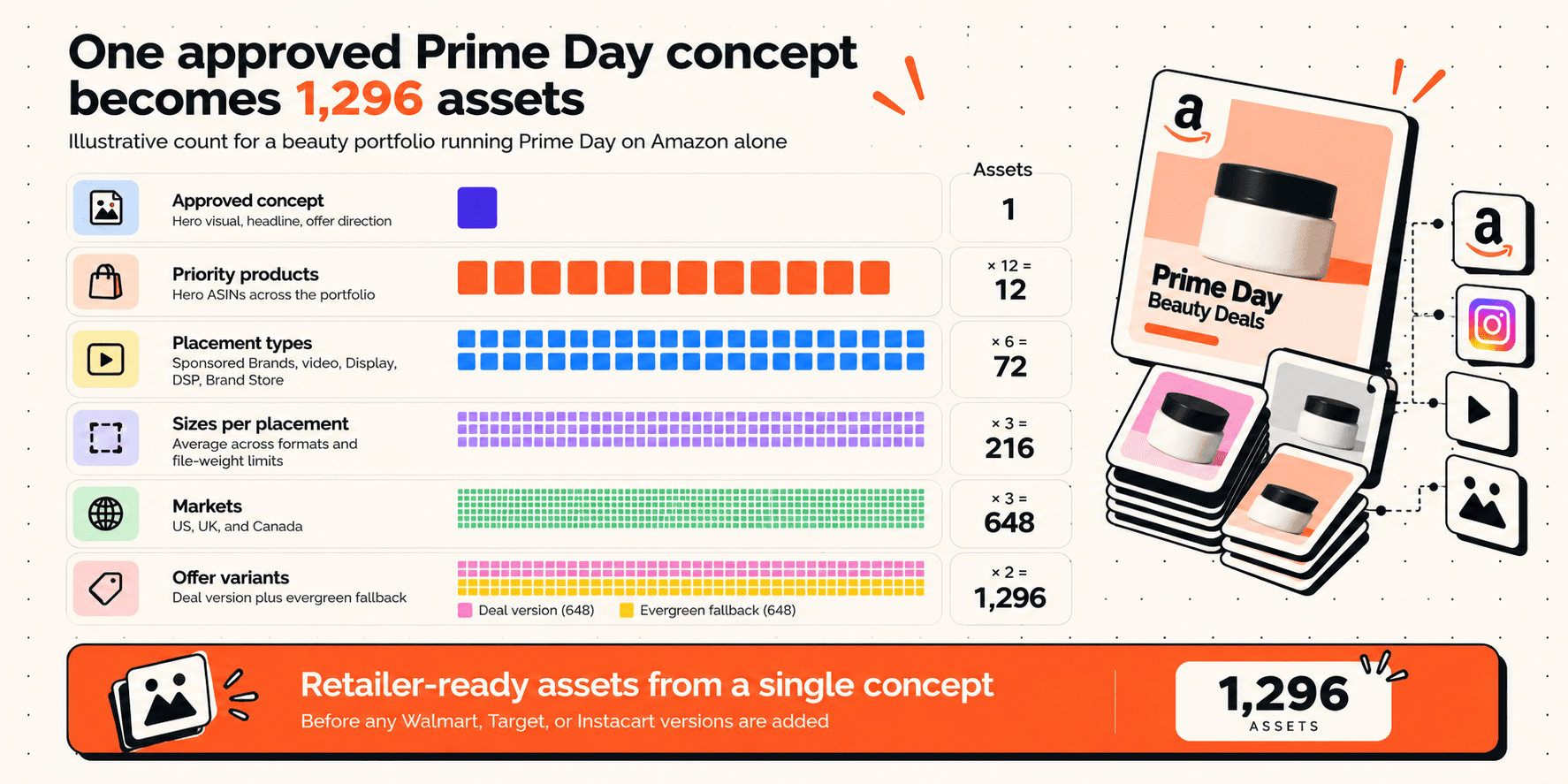
This is also where Prime Day budgets tend to go wrong. If you costed the event as a media line item plus a design sprint, you paid for the concepting and left out the adaptation work, which is where most of the hours go.
How Kohler scoped a peak-event creative package


For Black Friday and Cyber Monday 2025, Kohler needed 187 static assets and 44 videos. That's what a handful of concepts turn into once placements, sizes, and formats are multiplied out. Working with AI Studio across the engagement, Kohler reported six times its previous monthly creative volume, with static assets produced about 80% faster.
Write the full countdown before briefing, including video cutdowns, which are easy to forget and slow to make.
Split the count into new creative and derivatives at the same time. That split decides who does the work in Step 4.
4. Brief the masters and separate new creative from derivatives
Owner: Creative
Split the asset list from Step 3 into two piles before the brief goes out.
Campaign concepts, hero visuals, video storyboards, and headline direction. This work needs designers, art direction, and brand judgment.
Every size, retailer, market, product, and offer version of an approved master. It follows rules and rarely surprises anyone.
For most portfolio brands, the second pile is several times bigger than the first, and that changes how you brief. Build masters with variable zones for the product image, offer badge, headline, and logo, so each derivative inherits the approved design instead of being redrawn. A creative brief that names those variable fields up front saves a round of revisions later.
It changes legal review too. Brand and legal should approve the masters and the list of allowed offer text, not 600 individual assets. If legal has to see every variant, the review queue becomes the bottleneck in week four.
The derivative pile is also where agency and freelancer budgets quietly disappear. The hidden cost of manual creative versioning rarely shows up as one line item. It arrives as dozens of small resize and copy-swap tickets, each billed on its own.
How Newell Brands turned one content event into 470+ assets
Newell Brands, whose portfolio includes Sharpie, Rubbermaid, Graco, Calphalon, Coleman, Oster, and Yankee Candle, built its Prime Big Deal Days 2025 content around a single event. It hosted 109 creators at its Hoboken customer experience center, then repurposed the resulting videos across organic and paid social, Amazon storefronts, product detail pages, and a pilot of Amazon's Social Overlay ad format. The campaign produced 470+ pieces of content and 20 million impressions.
Put your effort into a small amount of genuinely new creative, then plan every placement it will feed before the shoot or design work starts.
Newell's source material was creator video. For paid and retail media assets, the equivalent is a master design with variable zones, keeping the 470th asset on the same brand rules as the first.
5. Build retailer versions from the masters, not from scratch
Owner: Creative operations
Shoppers don't stay on Amazon during Prime Day. Numerator's 2026 Prime Day tracker found more than half of shoppers compared prices across retailers, 49% shopped Walmart Deals, and 32% shopped Target Circle Deal Days. October looks similar, with Walmart's event running October 5 to 11 and Target's Circle deals landing the same week as Amazon's 48 hours.
So one promotion usually runs across three or four retail media networks in the same week. That's the point where "just reuse the Amazon assets" stops working.
Amazon, Walmart, and Instacart want different assets
Here's what the same promotion needs on each retailer, based on Amazon's asset-based creative specs, Walmart's Sponsored Brands specs, and Instacart's display creative guidelines.
Element | Amazon (asset-based creative) | Walmart Sponsored Brands | Instacart display |
Headline | 50 characters (25 in Japan) | 45 characters | 22 characters |
Logo | 1:1, at least 400x400 | PNG, 300x180, under 200KB | 120x120, cropped into a circle |
Hero image | Square, tall, or wide (1200x628 recommended for wide) | Optional 16:9, 1200x675 or larger | Banner at least 3200px wide (4:1 mobile, 8:1 desktop) |
Submission timing | At least a week before launch | Allow time for approval before launch | At least 3 days before the start date |
Read the headline row first. A message that fits Amazon at 50 characters gets cut to 45 for Walmart and to 22 for Instacart. One line of copy becomes three, and each one needs approval. The logo row asks for separate design decisions, since a circular 120x120 crop and a wide 300x180 PNG can't share one layout. If Target is in the plan, get Roundel's requirements from your rep before week six rather than after.
UK and Canadian listings often need adapted copy as well. Fold creative localization into this step instead of running it afterwards.
This is the step where manual versioning costs the most, and the one Rocketium's retail media ad production is built for: turning one approved master into retailer, size, product, and copy variations without rebuilding each asset by hand.
How Amberen covered six retailers from one set of masters
Amberen needed PDP tiles, A+ content, and video ads across Amazon, Walmart, Target, CVS, Meijer, and Walgreens. Working from approved masters in AI Studio, the brand produced 130+ assets and cut turnaround from about five days to under 24 hours, with each retailer's version built to that retailer's requirements.
Do the same: Build retailer versions from approved masters and check each one against that retailer's specs, not Amazon's.
Do it differently: Amberen is a single brand. With five brands, keep one shared spec table for all of them. A change to Walmart's logo rules then gets fixed once instead of five times.
Why this works: Retailers disagree on specs, not on the promotion. Building from one master keeps the message consistent while each retailer gets an asset it will accept.
6. Clear brand, legal, and platform checks before Amazon sees anything
Owner: Creative operations, brand, and legal
The worry in the final fortnight is specific: a batch of rejections arriving when there's no time left to fix them. Most of those rejections can be caught before submission, and two checks do most of the work.
What Amazon's ad policy says about deal messaging
Amazon's moderation rules include several points that regularly trip up deal creative.
Deal wording: "Deal" or "Deals" can only appear when an Amazon deal is live for the whole campaign.
Matching claims: Promotional copy has to appear on the product detail page and stay valid for the campaign.
End dates: Holiday promotions have to end within 24 hours of the event.
Event naming: Amazon's Prime Day advertising guide warns against calling out the event directly, such as naming a page "Prime Day Store."
Put these rules on the same checklist as your brand compliance checks. A rule like "no deal wording unless the offer status says approved" is easy to check automatically, and easy to miss by hand at asset 400 of 600.
Plan moderation to the longest published figure
Amazon publishes different moderation expectations depending on the ad product and the page you read. Plan to the longest one and treat anything faster as time back. Amazon also lets advertisers pre-moderate assets in bulk through the asset library and save approved assets for later campaigns or Store pages. Use that for evergreen variants early in the cycle.
If your Brand Store is getting a seasonal refresh, submit it alongside the ads. Our guide to Amazon Brand Store design covers the modules most brands update for events.
How NIVEA cut platform rejections by 98%
NIVEA built retailer-specific guidelines into its production workflow across 20+ retail platforms, so assets were checked against each platform's rules before submission. The result was 98% fewer platform rejections, with average turnaround falling from 36 hours to 3. Other brands handle deal wording by choosing different words altogether: during Prime Day 2025, Envision Horizons saw brands using "Summer Sales" language on storefront and PDP creative so they could upload compliant discount graphics.
Do the same: Write each retailer's rules into the workflow so assets are checked before submission, not after a rejection.
Do it differently: Keep a pre-approved list of safe event phrases, such as "Summer Sales," and copywriters won't be guessing in the final week.
Why this works: Every rejection costs a resubmission and another trip through moderation. Catching the problem before submission is far cheaper than fixing it after.
7. Plan creative waves for the whole event window
Owner: Paid media
Most brands build one creative set and run it for the whole event, and the spending pattern argues against that. Adobe Analytics data reported by Digital Commerce 360 put Day 1 of Prime Day 2026 at $8.3 billion of the $26.4 billion spent online in the US. More than two-thirds of the spending happened after your launch creative had been live for 24 hours.
Media teams have already adjusted. Skai found advertisers paced spend evenly across all four days instead of front-loading Day 1, which helped blended CPC reach a record low of $1.63. Creative should follow the same pacing. Showing one asset to the same deal-hunting shopper for 96 hours wears it out faster than an always-on campaign would, and creative fatigue shows up in the back half of the event.
October compresses this further. Prime Big Deal Days runs 48 hours across 22 countries, with new deals dropping three times each day. Creative that sits still while the offer changes six times drifts out of date fast.
Plan at least two waves, and get both through approval before the event opens.
Wave one: Launch creative built on the headline offers
Wave two: Different products or messaging for the second half of the event
There's a newer kind of shopper to plan for too. The same Adobe data showed AI-referred traffic to US retail sites rose 89% during Prime Day 2026 and converted 40% better than non-AI channels. Those shoppers arrive further along in their decision, which suits product-specific creative more than broad awareness assets. The creative testing framework you use for always-on campaigns works here as well: decide in advance which wave-two variant replaces which wave-one asset.
Practical Tip Produce wave two alongside wave one. Production and moderation times don't shrink during the event, so a mid-event brief goes live after the deals end. Give the AI-assisted shopper a product-led variant as well, since Numerator found one in five Prime Day 2026 shoppers used AI-powered shopping tools. |
How Moulinex split Prime Day into three creative phases
Moulinex, the Groupe SEB small-appliance brand known for its air fryers, planned Prime Day 2025 in three phases: a lead-up to build engagement, the event days to push conversion, and a lead-out that used Amazon DSP retargeting to reach shoppers afterwards. Prime Video ads brought in new audiences at the top of the funnel. Compared with Prime Day 2024, the brand reported 112% more paid share of voice and a 32% lift in conversion rate.
Do the same: Give each phase its own creative job instead of running launch assets from the lead-up to the lead-out.
Do it differently: Add a mid-event wave inside the event phase. Four days is long enough for launch creative to tire before the lead-out even begins.
Why this works: Fresh creative lands on Day 3, when fatigue sets in, without anyone briefing a designer in the middle of the event.
8. Pre-build the fallback before an offer changes
Owner: Ecommerce and creative
The offer sheet from Step 2 pays off here. Offers change after assets are built, and the changes don't always come early.
Moving deadlines: Deal submission dates shifted twice in 2026.
Late discounts: Prime Exclusive Discounts can be submitted up to 12 hours before the event ends.
Dropped products: A product that loses the Buy Box or falls out of deal eligibility can leave the promotion, taking every asset built around it with it.
When that happens, you need a replacement that has already cleared moderation, not a new brief. For every priority product, keep an approved evergreen variant with no offer text. If a deal disappears, swap in the evergreen version. If a late deal is approved, update the offer fields and regenerate from the master.
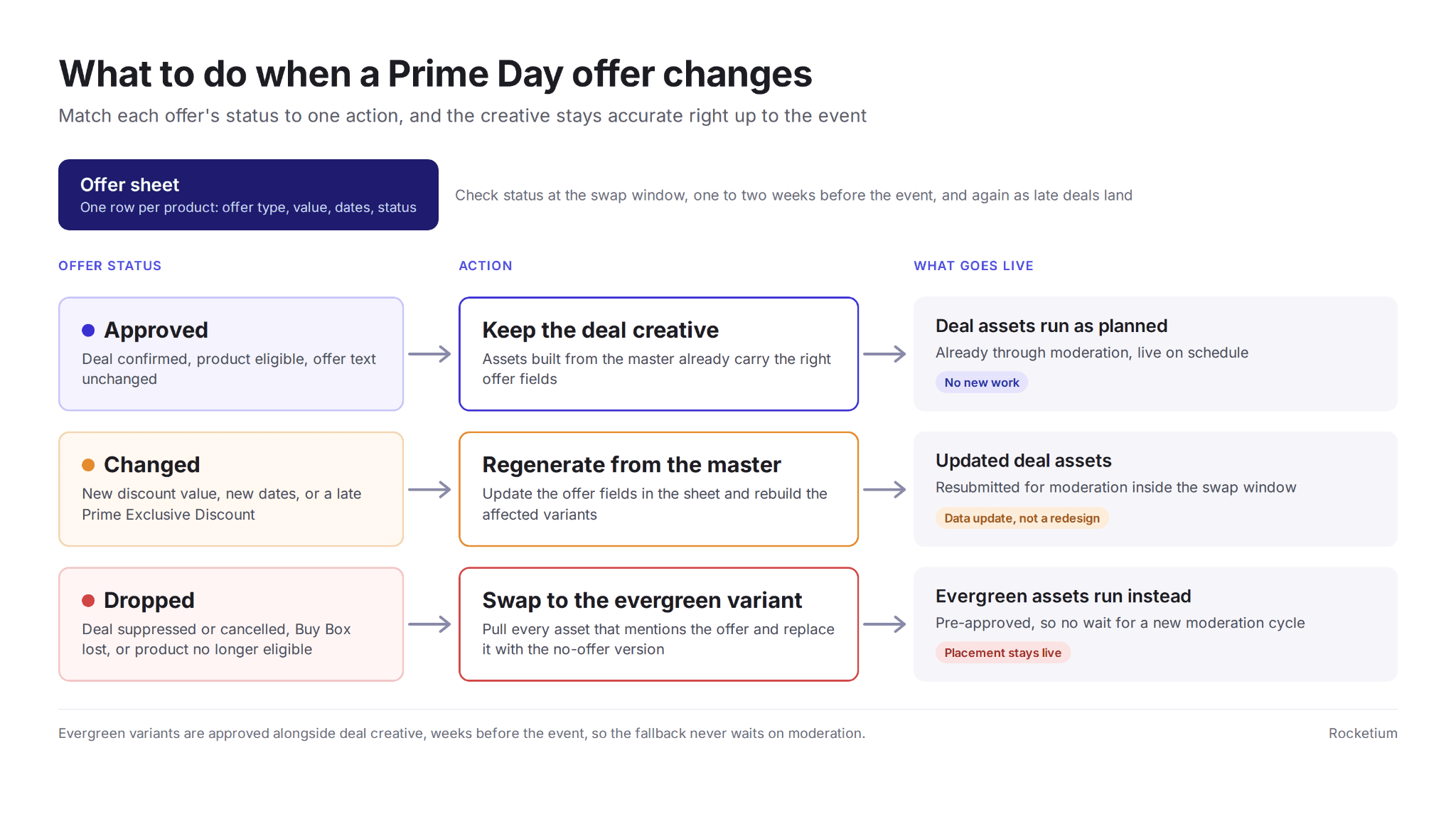
Alt text: Prime Day offer change fallback flow for swapping deal creative with approved evergreen variants
That's what the swap window in the calendar is for. Without it, you end up choosing between ads that promise an offer you no longer have and pausing the placement entirely.
What incrementality testing says about your evergreen creative
Few brands publish what they did when a deal fell through, but incrementality testing points the same way. Haus, which runs incrementality tests for consumer brands, advises brands to test their Prime Day creative against their standard top-performing creative and back whichever drives more incremental lift. The winner may be the creative you already run every day.
Do the same: Keep your best evergreen asset in the running instead of assuming deal creative always performs better.
Do it differently: Pre-approve that evergreen variant for every priority product. The asset you test against then doubles as your fallback if a deal drops out.
Why this works: The evergreen variant is already approved, so a lost deal costs you a swap instead of a week of moderation.
9. Keep the setup for the next peak event
Owner: Paid media, ecommerce, and creative
Prime Day marketing doesn't end when Prime Day does. Prime Big Deal Days follows in October, and Black Friday Week and Cyber Monday deal submissions stay open through October 20. Amazon's Spring Sale comes in March, and Prime Day returns in the summer.
That's four peak events a year, with the same kinds of assets across the same retailers. Offers, priority products, and hero visuals change each time. The spec list, retailer requirements, size matrix, market versions, and approval path mostly don't. After each event, save four things.
Masters and templates: With their variable zones intact
Spec list: Updated with any retailer changes you ran into
Approval path: Who signed off on what, and where it stalled
Numbers: Turnaround time, rejection rate, the share of assets that were derivatives, and cost per asset
Those numbers sit comfortably alongside the creative operations metrics most retail teams already track, and they tell you whether the next event will be easier than the last.
How MegaFood reused one template system across seasonal sales
MegaFood rebuilt its Amazon listings on locked brand templates, refreshing 106 product pages and 29 A+ content projects. The same system then carried its seasonal campaigns, including a New Year's Mega Sale, a Spring Reset Sale, and Walmart retail media activations. Updating listings had taken eight months with freelancers. With AI Studio, 100+ products were refreshed in a month at 30% lower cost, the kind of gain behind scaling creative production from one event to the next.
Do the same: Keep templates, specs, and approval paths after each event, and start the next one from them.
Do it differently: Put the post-event save on the calendar with an owner and a date, usually the week after the event, before the team moves on to the next brief.
Why this works: Most of the work for the next event is already defined. Reusing it means each peak event starts at week four's progress instead of week zero.
What to do before the next deal deadline
The next peak event is already on the calendar. Before its deal deadline, do three things.
Count the real asset requirement: Every placement, retailer, and market, not the number of concepts in the deck.
Build the backwards calendar: Start from Amazon's 7 to 8 business days of production, add 24 hours per revision and a week of moderation, then compare it with your current plan.
Split the asset list: Put new creative in one pile and derivatives in the other, then check which pile your agency hours go to.
If most of those hours go to resizing, retailer versions, and copy swaps, that's the part to fix before the next event. Bring one completed peak-event brief to a Rocketium AI Studio demo and compare the turnaround with your last Prime Day.
Frequently asked questions
Quick answers to the questions teams ask most while planning Prime Day creative.
When should brands start preparing Prime Day creative?
Roughly ten weeks out for a multi-brand portfolio. Amazon quotes 7 to 8 business days to produce a DSP display ad, adds 24 hours per revision, and asks for ads a week before launch, before your own brand and legal review.
How many creative assets does a Prime Day campaign need?
Multiply priority products by placement types, sizes, markets, and offer variants. A portfolio promoting 12 products across 6 placement types in 3 markets passes 600 assets on Amazon alone, before any Walmart or Instacart versions.
Can you say "Prime Day" in your ads?
Be careful with it. Amazon's guidance steers advertisers away from naming the event in branded placements, and deal language is only allowed while an Amazon deal runs for the full campaign.
How long does Amazon take to approve ad creative?
Plan for a week. Amazon wants Sponsored Brands and display ads submitted seven days before they go live, since rejected ads need time to be fixed and reviewed again. Pre-moderating evergreen assets early lowers the risk.
Can you reuse Amazon creative on Walmart and Instacart?
Rarely as-is. Walmart caps Sponsored Brands headlines at 45 characters and needs a 300x180 PNG logo. Instacart caps display headlines at 22 characters, crops logos into circles, and wants creative three days before launch.
What happens to your ads if a deal is suppressed?
Any asset promoting that offer becomes unusable. Brands that pre-approve an offer-free version of each priority product can swap it in immediately instead of waiting on a new moderation cycle.
Does Prime Big Deal Days need separate creative?
Yes. It runs 48 hours with three deal drops a day, so offers change more often than during Prime Day. Plan two creative waves before the event rather than reusing summer assets.